
Overview
You now have a Listing Quality Score (LQS) — a single, quantifiable measure of how well each of your product listings is built. LQS pinpoints exactly what is holding a listing back and gives you clear, actionable steps to fix it, so you can improve product visibility, conversion, and sales.
Available: Newegg.com, Neweggbusiness.com, Newegg.ca
What is the Listing Quality Score (LQS)?
LQS is a comprehensive metric for evaluating the quality of your product listings. It helps you quickly identify weaknesses, understand clear directions for optimization, and improve visibility, conversion rates, and sales. Your score is calculated across five core dimensions:
- Customer Experience — the quantity and positivity of your product reviews, reflecting buyer satisfaction. Strong ratings build the trust that drives conversion.
- Content Completeness — how complete and accurate your key listing information is (title, description, main features, and images). More complete content gives buyers the information they need before purchase.
- Content Discoverability — how easily buyers can find your product through search and browsing, based on your title, keywords, and other listing elements.
- Shipping Experience — the strength of your shipping commitments and shipping fee settings, which directly affect buyers’ purchase decisions.
- Transactibility — whether the product has inventory available for purchase, preventing stockouts that hurt visibility and sales.
Please note: LQS only considers activated products (Global products are excluded), and listing data and score updates may be delayed by 48 hours or more.
Where to find your LQS
Go to Items > Pricing & Inventory. At the top right you will see your Listing Quality Score (LQS) and your overall seller quality score.
- Click Listing Quality Score to open the LQS homepage, where you can view the overall quality status and distribution of your products.
- Hover over the quality score to see your store’s detailed scores and GMV performance for the last 30 days and last 7 days (GMV is not shown if there is no data for the product).
- Click Listing Quantity Details to enter the LQS homepage.

Seeing LQS in your Pricing & Inventory lists
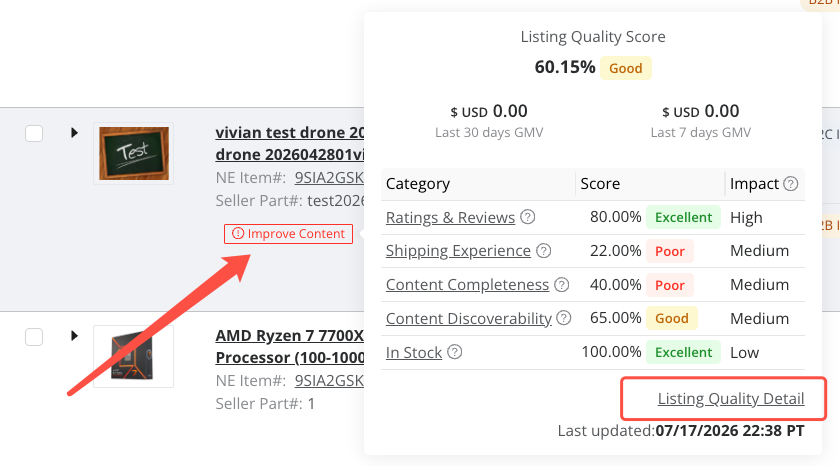
If a product has low Content Completeness or low Content Discoverability, a Improve Content label appears to remind you to improve its content quality.
- Hover over Improve Content to see the product’s overall quality score and its GMV performance for the last 30 days and last 7 days (GMV is not shown if there is none).
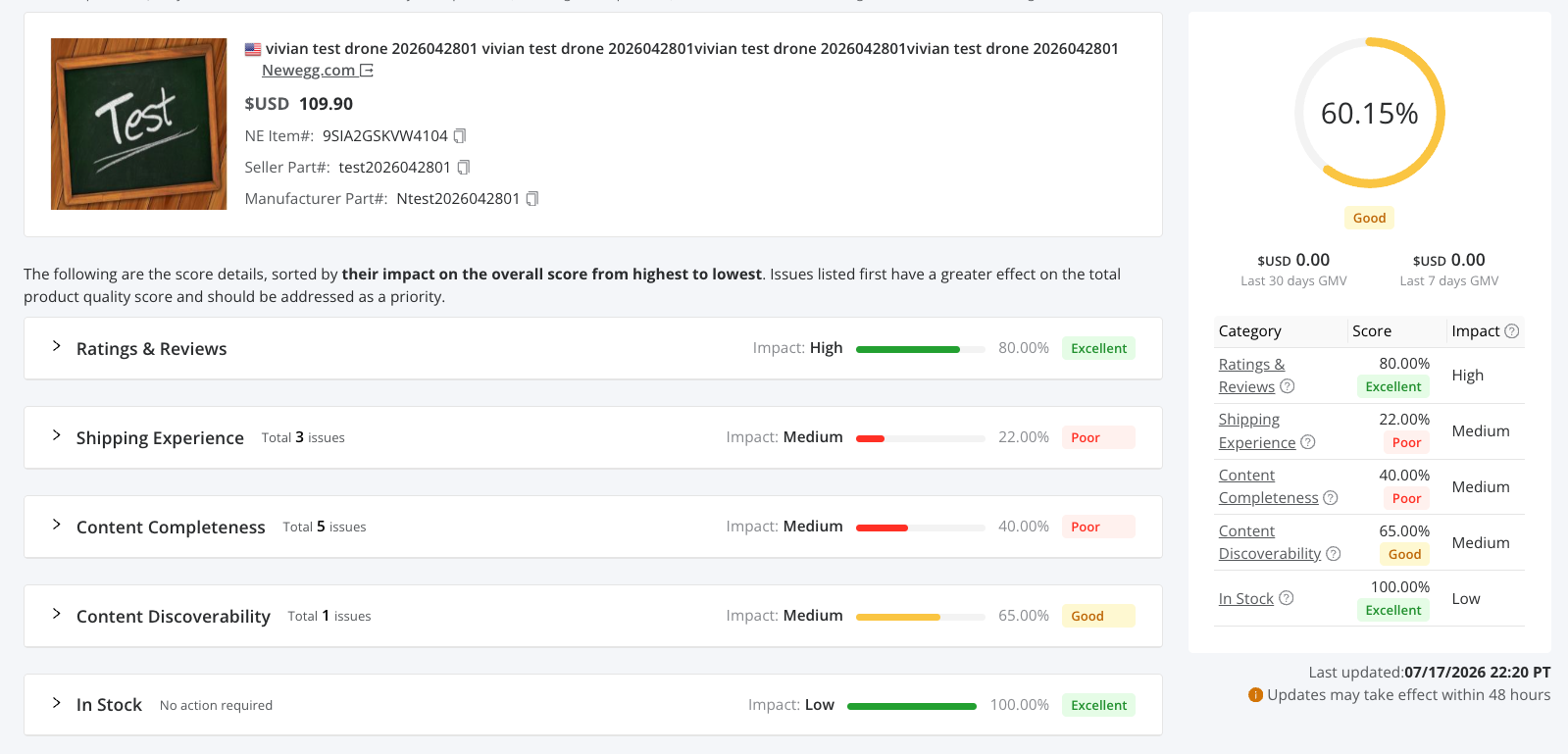
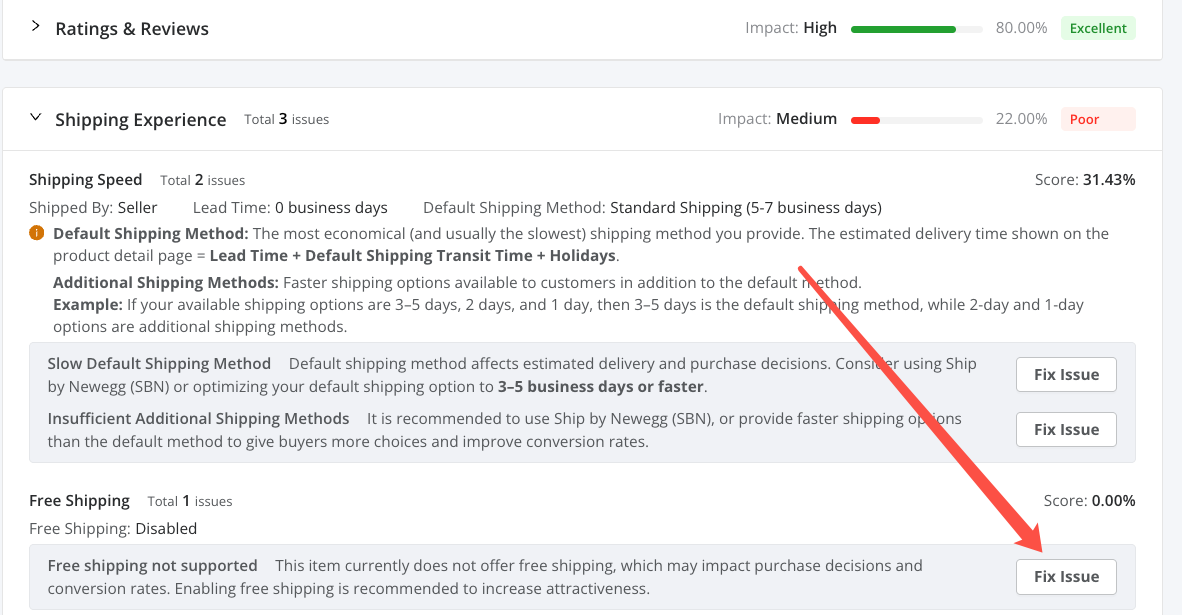
- Click Listing Quality Details to open the Listing Quality Optimization page and view detailed scores and improvement items.
- When editing a product, you will see the Overall Quality Score, Content Completeness Score, and Content Discoverability Score. Hover over the overall score to see it alongside GMV performance, or click any of these scores to open the optimization page and work through the improvement items.
Using the LQS list
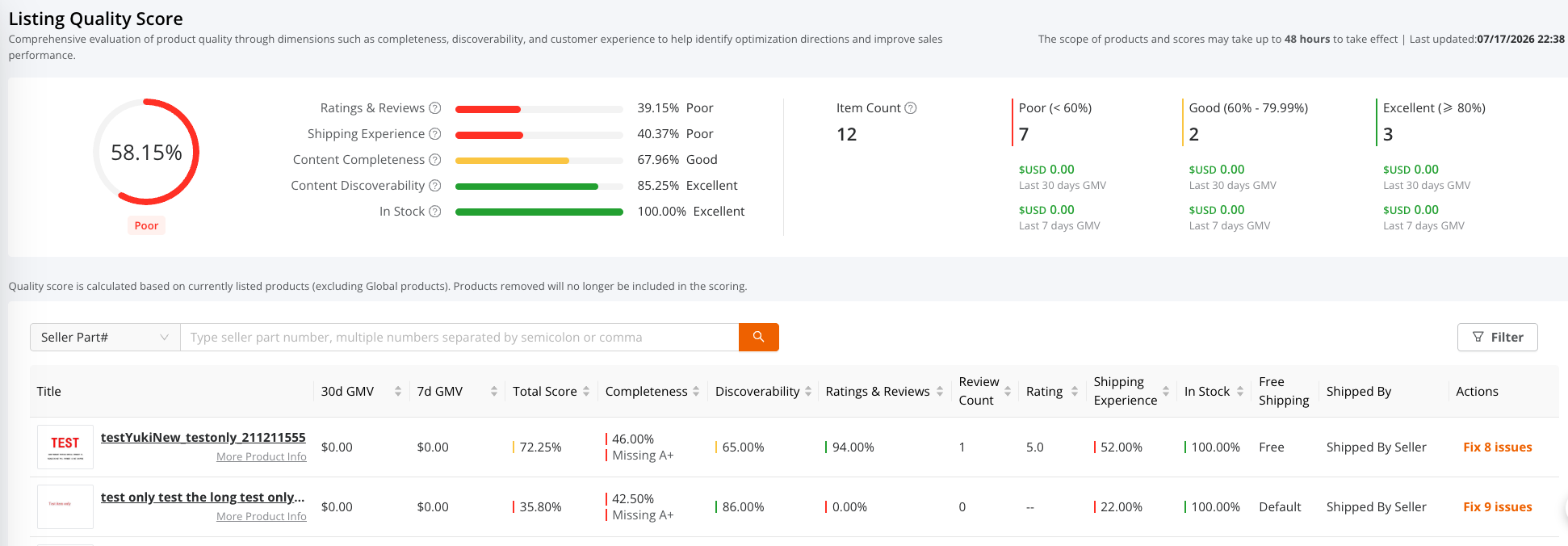
In the LQS list you can efficiently manage and optimize your listings. For each product you can see the overall quality score and each dimension score alongside key business metrics — GMV performance (last 7 days / last 30 days), product ratings, number of reviews, and whether A+ content is configured. Dimension scores are highlighted with red and orange indicators so you can quickly spot products that need attention.
- Click Fix X issues to go straight to that product’s quality optimization page.
- An All good status means the product meets quality standards and needs no immediate action; Fix X issues shows the number of improvable items.
- Filter by GMV, rating, review count, or any quality dimension to find your priority items, and sort by the same fields to compare quality and sales performance across listings.
Understanding your score
Scores range from 0% to 100%, and each product is graded accordingly:
- Excellent: 80% or higher
- Good: 60% to 79.99%
- Poor: below 60%
The homepage also shows your product count distribution and GMV performance across the different score ranges (last 7 days / last 30 days), helping you quickly see which products’ quality is holding back your sales performance.
The five dimensions in detail
1. Customer Experience
This dimension focuses on real buyer feedback — the number of product reviews and your average product rating — a key factor in buyer trust and conversion. Prioritize products with a 0 rating or 0 reviews, and maintain consistent product quality and after-sales service to encourage buyers to leave reviews.
To avoid penalizing newly activated products that have not had time to earn reviews, a growth window applies to products with no reviews:
- Activated within the last 30 days with no reviews → Customer Experience score = 100
- Activated within the last 90 days with no reviews → score = 80
- Activated within the last 6 months with no reviews → score = 60
- Activated over 6 months ago and still no reviews → score = 0
2. Content Completeness
Complete, professional product information is the foundation for higher conversion. To score well:
- Specs: fill in product attributes in detail so buyers can quickly understand key features.
- Images: provide at least 3 product images.
- Title: 10–200 characters, starting with the brand name.
- A+ Content: configure an A+ page where applicable.
- Bullet Points: at least 3 bullet points, each 10 characters or more.
- Description: 100 characters or more (A+ content automatically meets this).
Complete your product specification attributes, ensure you have enough images, and for eligible products it is strongly recommended to configure A+ content.
3. Content Discoverability
This determines whether potential buyers can find your product. The values of prioritized properties are displayed first on product cards in the website search results, so complete the prioritized attributes recommended for your category and include relevant search keywords to improve your search visibility and matching.
4. Shipping Experience
Your shipping commitments directly affect buyers’ purchase decisions and conversion. The estimated delivery shown on the product page equals your lead time plus your default shipping transit time plus holidays, where your default shipping is the most economical (usually slowest) method you offer. Recommended targets:
- Ship by Newegg (SBN) or SBS lead time of 1 day or less.
- SBN or SBS default shipping of 3 business days or less, and offer an additional shipping option faster than your default.
- Provide free shipping.
5. Transactibility
Your product needs available inventory to be purchasable. Regularly check inventory levels to avoid stockouts that could affect your visibility and sales.