
The Listing Quality Score (LQS) is a comprehensive metric for evaluating the quality of product listings, designed to help sellers.
1. Listing Quality Score
LQS will help sellers:
- Quickly identify weaknesses in their listings
- Understand clear directions for optimization
- Improve product visibility, conversion rates, and sales
LQS evaluates listing quality across five core dimensions:
- Customer Experience
Measures the quantity and positivity of product reviews, reflecting buyer satisfaction and recognition. High ratings and positive reviews help build trust, which is a key factor influencing conversion rates. - Content Completeness
Evaluates the completeness and accuracy of key listing information such as product title, description, main features, and images. The more complete the content, the more information buyers have before purchase, reducing decision-making effort. - Content Discoverability
Assesses how easily the product can be found on the platform, including whether the title, keywords, and other listing elements help the product appear in search and browsing scenarios. Higher discoverability increases the chance of being seen by potential buyers. - Shipping Experience
Measures the effectiveness of shipping commitments and shipping fee settings, reflecting the overall buyer experience. A better shipping experience directly impacts buyers’ purchase decisions and satisfaction. - Transactability
Ensures the product has available inventory for purchase, preventing stockouts that could affect visibility and sales.
⚠️ Notes:
- LQS only considers activated products (Global product listings are excluded).
- Listing data and score updates may be delayed by 48 hours or more.
2. Listing Quality Score (LQS) Access
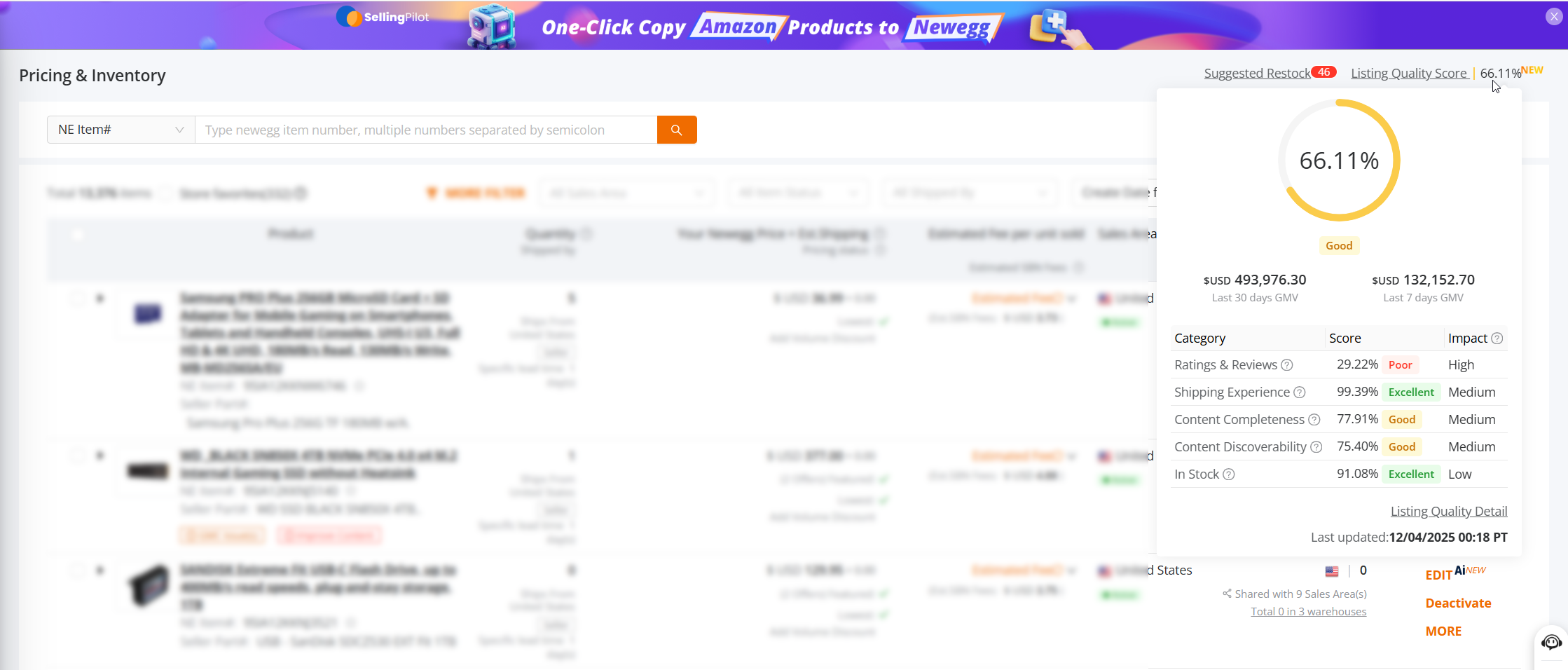
On the Items > Pricing & Inventory page, the system displays at the top right:
- Listing Quality Score (LQS)
- Overall Seller Quality Score
Access the LQS Homepage
Click Listing Quality Score to enter the LQS homepage, where you can view the overall quality status and distribution of your products.
View Score Details
Hover over the Quality Score to see:
- Your store’s detailed quality scores
- GMV performance for the last 30 days and last 7 days (if no GMV data is available for the product, GMV information will not be displayed)
Click “Listing Quantity Details” to enter the Listing Quality Score (LQS) homepage.
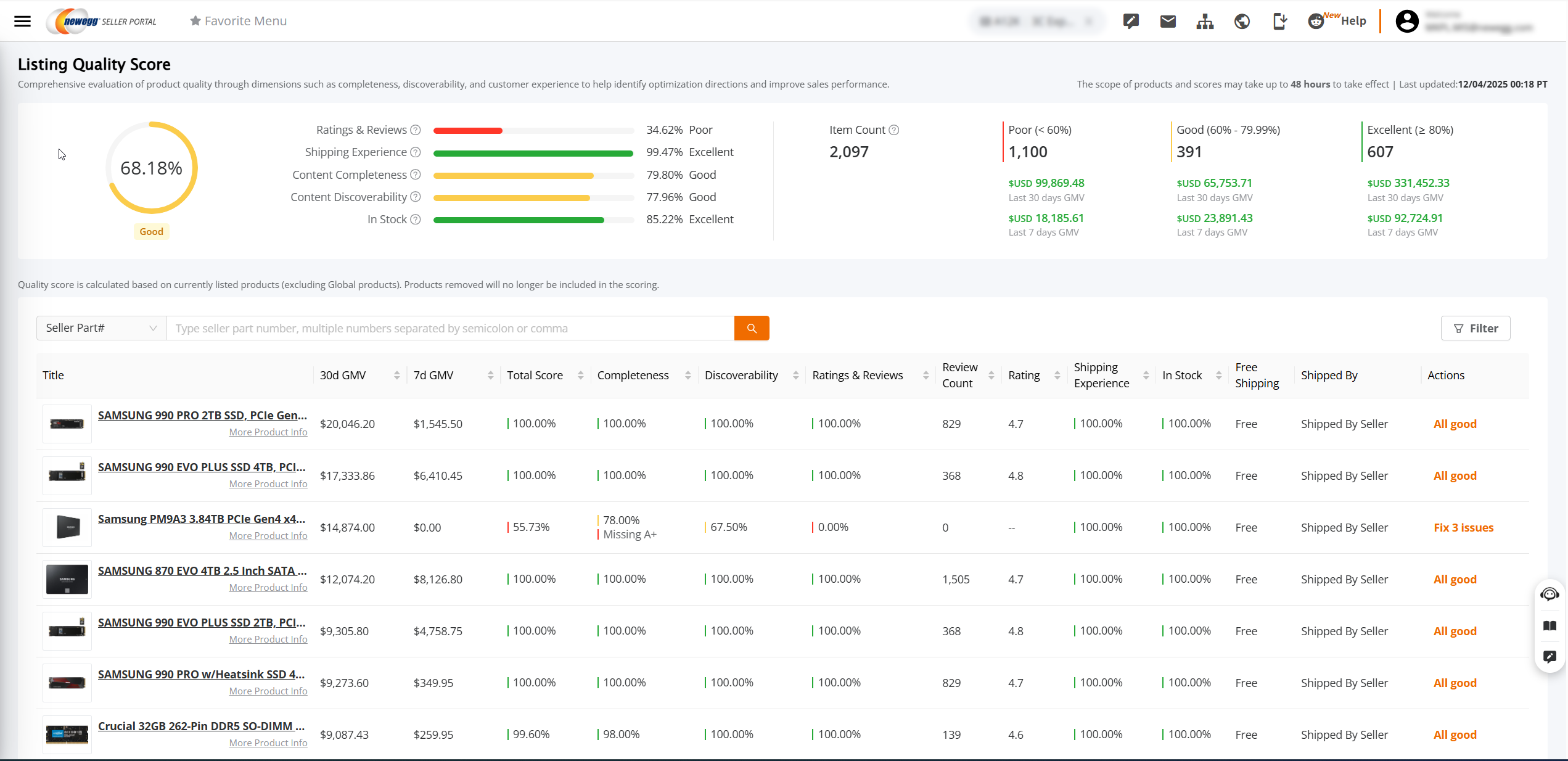
3. LQS Score Ranges Explained
Score Range: 0%–100%
Product Grade:
- Excellent: ≥ 80%
- Good: 60%–79.99%
- Poor: < 60%
The system also displays:
- Product count distribution
- GMV performance across different score ranges (last 7 days / last 30 days; if no GMV data, it will not be shown)
Helps you quickly identify:
👉 Which products’ quality is holding back sales performance
4. LQS Dimensions and Explanation
1️⃣ Customer Experience
Customer Experience focuses on real buyer feedback and is a key factor affecting buyer trust and purchase conversion.
| Product Rating | Average product rating |
✅ Recommendations:
- Prioritize products with 0 rating / 0 reviews
- Maintain consistent product quality and after-sales service to encourage buyer reviews
📌 No-Review Products Scoring Rule (Growth Mechanism):
To avoid penalizing newly activated products due to insufficient reviews, the system provides a reasonable growth window for new products:
- Activated within the last 30 days and no reviews → Customer Experience score = 100
- Activated within the last 90 days and no reviews → Customer Experience score = 80
- Activated within the last 6 months and no reviews → Customer Experience score = 60
- Activated over 6 months ago and still no reviews → Customer Experience score = 0
2️⃣ Content Completeness
Ensuring product information is complete and professional is the foundation for improving conversion rates.
| Images | At least 3 product images |
| Title | 10–200 characters, starting with brand name |
| A+ Content | Configure A+ page (if applicable) |
| Bullet Points | At least 3 bullet points, each ≥10 characters |
| Description | ≥100 characters (A+ content automatically meets this) |
✅ Recommendations:
- Complete product specification attributes and ensure sufficient number of images
- For eligible products, it is strongly recommended to configure A+ content
3️⃣ Content Discoverability
Determines whether your product can be “discovered” by potential buyers.
| Search Keywords | Include relevant keywords |
✅ Recommendation:
- Complete the prioritized attributes recommended for the category.
- Add core search keywords to improve search visibility and matching.
4️⃣ Shipping Experience
Directly affects buyers’ purchase decisions and conversion rates.
Default Shipping
|
SBN or SBS default shipping ≤ 3 business days. |
Additional Shipping
|
SBN or SBS provides faster additional shipping than the default. |
| Free Shipping | Provide free shipping |
Recommended Criteria
- SBN / SBS lead time ≤ 1 day
- SBN / SBS Default shipping ≤ 3 days and offer additional shipping faster than the default
- Provide free shipping
Notes
- Default shipping is the most economical (usually slowest) method.
- Estimated delivery displayed = lead time + default shipping transit time + holidays.
✅ Optimization Suggestions
- Provide free shipping.
- Use Ship by Newegg (SBN) or SBS Ensure default shipping ≤ 3 days and offer faster additional shipping options to boost conversion.
5️⃣ Transactability
✅ Recommendation:
- Regularly check inventory levels to avoid stockouts that could affect sales.
5. Listing Quality Score (LQS) List & Operations
In the LQS list, you can efficiently manage and optimize your product listings:
📊 View Product Information
- Check the overall quality score (LQS) and individual dimension scores for each product.
- View key business metrics simultaneously, including:
- GMV performance (last 7 days / last 30 days)
- Product ratings
- Number of reviews
- Whether A+ content is configured
- Dimension scores are visually highlighted with red/orange indicators to help quickly identify products with issues or items that need improvement.
🛠 Quick Optimization Actions
- Click “Fix X issues” to directly navigate to the product’s quality optimization page.
Status Indicators:
- ✅ All good: The product meets quality standards; no immediate optimization required.
- ⚠️ Fix X issues: The product has improvable items; the system displays the number of issues (X). Prompt optimization is recommended to enhance product visibility and conversion performance.
🔍 Filtering & Sorting Capabilities
- Filtering: Filter products by GMV, rating, review count, or individual quality score dimensions to quickly identify priority items for optimization.
- Sorting: Sort by GMV, rating, review count, or quality score dimensions to compare product quality and sales performance across listings, supporting better decision-making.
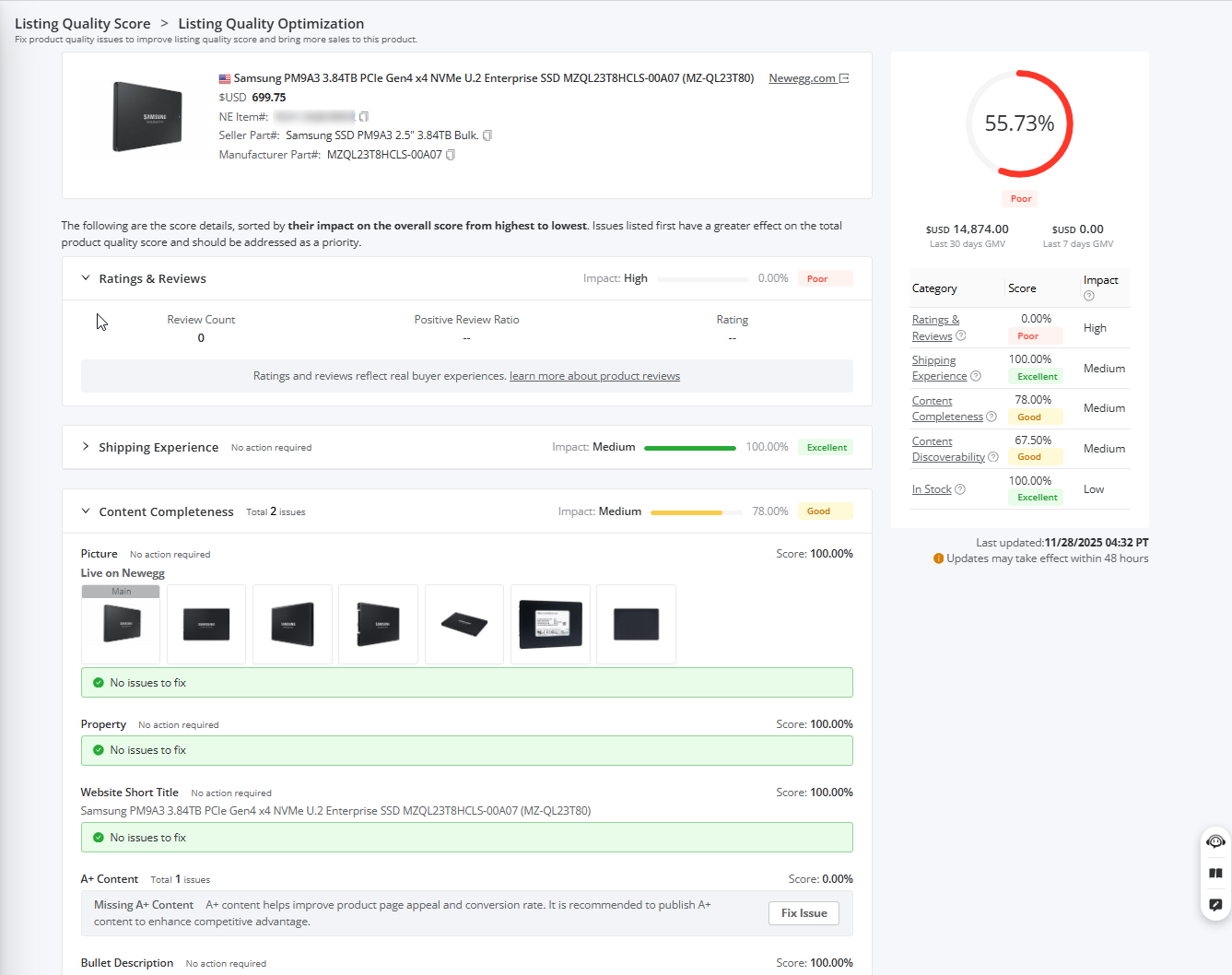
6. Listing Quality Optimization Page
The Product Quality Optimization Page helps sellers identify and fix issues that impact their Listing Quality Score (LQS), improving product information quality and driving more visibility and sales.
- Issue Prioritization:
The system sorts issues from highest to lowest impact on the overall quality score.
Issues at the top have the greatest impact and should be prioritized for resolution.
Status Indicators:
- ✅ No Issues:
- The system displays “No issues to fix”, indicating the product meets quality standards.
- ⚠️ Issues Present:
- The system lists the metrics that need improvement along with actionable optimization suggestions.
- Sellers can click “Fix Issue” to follow the system guidance and optimize the content, thereby improving the product’s quality score.

7. Viewing Listing Quality Score in Inventory & Pricing Lists
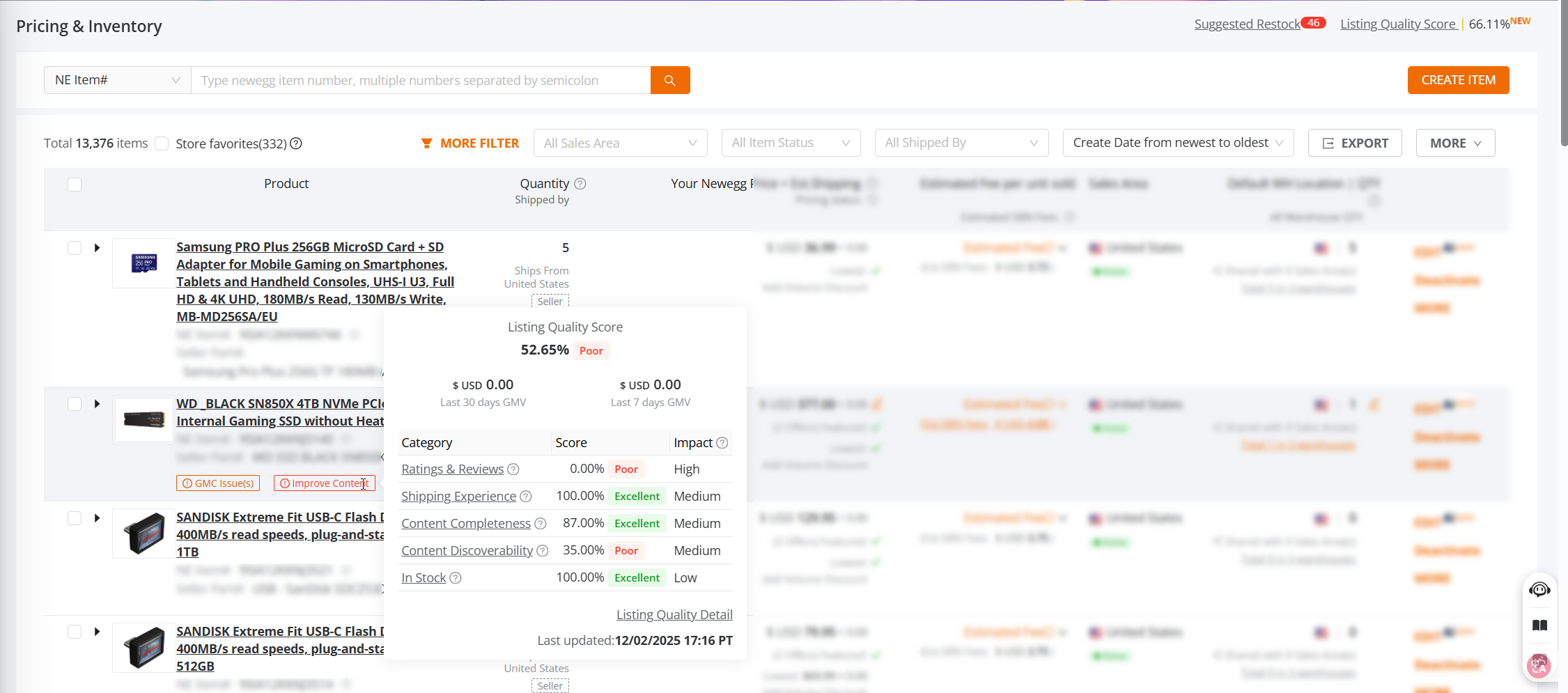
If a product has low Content Completeness or low Content Discoverability, a “Needs Improvement” label will be displayed, reminding sellers to pay attention to content quality improvements.
- Hover Over “Improve Content”:
- Displays the product’s overall quality score
- Shows GMV performance for the last 30 days and last 7 days (if no GMV exists, it will not be displayed)
- Click “Listing Quality Details”:
- Navigates to the Listing Quality Optimization Page, where sellers can view detailed scores and items that need improvement, and optimize product content accordingly.
- Navigates to the Listing Quality Optimization Page, where sellers can view detailed scores and items that need improvement, and optimize product content accordingly.
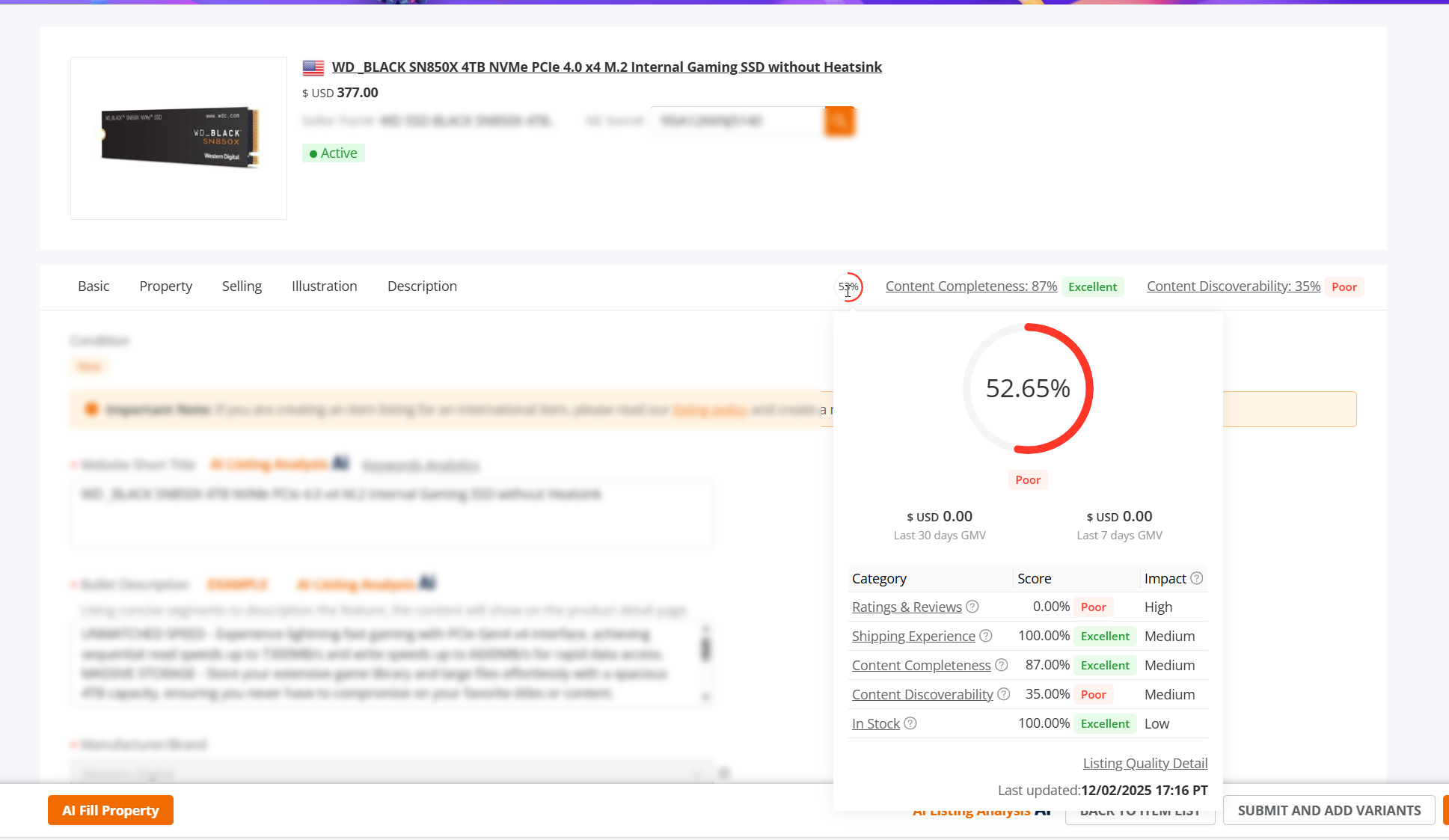
- When Editing a Product:
- The following scores are displayed:
- Overall Quality Score
- Content Completeness Score
- Content Discoverability Score
- Hovering over the Overall Quality Score shows the product’s overall score and GMV performance (last 30 days and last 7 days)
- Clicking Overall Quality Score, Completeness, or Discoverability also navigates to the Listing Quality Optimization Page to view detailed scores and improvement items for optimization.
- The following scores are displayed:

