Newegg Marketplace Seller AcademyNewegg Marketplace Seller Academy
    • Seller Success Guide
    • How to Register as a Seller
    • Apply to Sell on Newegg Marketplace
    • Seller Portal & Service Guides
    • Link to Seller Portal
    • Download App
      • Campaign Type
      • SEM Tool
      • Marketing Tools
    • Shipping & Fulfillment
    • Newegg Marketing
      • Accelerated Payment
      • Capital Advance
    • Seller Academy
      • Seller Payment Disbursement
      • Global Seller Payment Options
      • View Payment Reports
    • Success Stories
    • Integration and Service Partners
    • Policies & Forms
    • Frequently Asked Questions
    • Navigation List/Taxonomy Guide
  • Developer API
  • Contact Us
  1. Home
  2. Marketplace Policies
  3. Inaccurate Content and International Version Products Listing Policy

Inaccurate Content and International Version Products Listing Policy

Contents

  • Inaccurate Content Policy
  • International Version Products Listing Policy

Inaccurate Content Policy

This policy describes situations in which inaccurate content may arise.  Our policy is that all content must be entirely accurate.  These examples are not exhaustive but are used for illustrative purposes only in order to prevent them from occurring. 

Scope:

The inaccurate content policy covers all content for an SKU including the website’s short title, product description, images, videos, logos, property values, manufacturer names, manufacturer part numbers, and UPC.  This document specifically addresses the accuracy of the content.  Another area this policy covers is nonsensical information.  Nonsensical information not only fails to provide useful information for customers but also confuses them.

Scenarios:

  1. A mismatch between the information in the website’s item condition, short title, image, and property value. There is no easy way to determine which information is accurate. Why does the item state “New” but in the Description, it states “Refurbished“? Did the seller just upload the wrong image? Is the image correct, but the product description is for the wrong SKU? The only way to resolve this issue depends on the UPC or Manufacturer’s Part # for the SKU.
  2. The product description gives inaccurate information about the product. For example, a product description for an SKU may state that a free accessory is included, but this is untrue. This usually happens when sellers are trying to include a free item to promote their product. However, Newegg Marketplace is strict when it comes to bundling. If the SKU normally does not include any additional accessories or items, the seller should create a different SKU for that bundle. Another scenario is when the product description is for the wrong SKU.
  3. Wrong manufacturer name. The manufacturer name is required to create an SKU because we use this information to uniquely identify an SKU. Because some manufacturers have similar names, it is important that the seller choose the correct name. Choosing the wrong manufacturer name or “Generic” type manufacturer names may be misleading to our customers and any items with inaccurate content could be deactivated at Newegg’s discretion.
  4. Wrong Manufacturer Part Number (MPN). This is usually required to create SKUs. We rely on this information to uniquely identify an SKU. It is important that sellers do not modify the manufacturer part number they receive from the manufacturer for their SKUs. The most common error occurs when the syntax is modified. For example, some manufacturer numbers include dashes and the seller creates the SKU without the dashes. Sometimes sellers use their seller part number as the manufacturer part number; there are cases where the seller uses the UPC number as the manufacturer part number. Another common case is when the seller appends an “-R” to the manufacturer part number to specify that the item is refurbished. Any changes to the manufacturer part number received from the manufacturer specifications are prohibited.
  5. Wrong UPC. This is usually required to create SKUs. We use this information to uniquely identify an SKU. It is important that sellers do not modify the UPC they receive from the manufacturer. The most common error occurs when an Excel feed is used where the setting eliminates leading zeros from numbers in cases where the UPC code starts with a zero.
  6. Nonsensical information. All information should be understandable for the customer and appropriate. The most common occurrence is found with information for sizes and colors. Due to the wide variance of values for properties like size or color, normalizing the data is imperative for sellers. Another common occurrence is when the wrong information is supplied for a property. Another common occurrence is when the seller uses images that are fuzzy or are fillers such as “Image Coming Soon”.
  7. Duplicate listings of the same SKU. As previous scenarios have mentioned, our system will create separate listings for the same SKU if the UPCs, Manufacturer Name, or Manufacturer Part # differ. Sometimes this happens when sellers modify the Manufacturer Part # of the same SKU to list separate compatibility. Also, see the section on how to list compatibility information. Another situation when this happens is when a seller creates more than one listing by creating SKUs that come in different packs, such as the same SKU that comes in a pack of 2 or a pack of 10. Creating different packages for the same of creating separate listings is also prohibited. There are two exceptions: if each package has a separate UPC, or if there is a property called “selling unit.”
  8. Misleading Information/Portrayal of Prohibited SKUs. Any attempt to mislead a customer to think that an SKU could be something other than what it really is. In addition, any portrayal of an SKU that would violate the offensive content policy or Prohibited Items List is a violation. Sometimes this happens when a legal product is portrayed as something illegal, or when a toy is portrayed to look like a real object.
  9.  Editing content so that the listing represents a different product/SKU. Sellers may edit titles, descriptions, and other content only to more clearly and accurately describe the same product. Sellers must not change core product attributes (such as brand, series, model number, capacity, or other key specifications) in a way that causes the listing to represent a different product or SKU.

    For example, changing a graphics card listing from “RTX 3080” to “RTX 2060,” or changing a 1TB SSD to a 512GB SSD, is not permitted. In these cases, the seller must create a new SKU and item number for the different product instead of repurposing the existing listing.

Please Note: Violations of content policy may result in, but are not limited to, content correction requests, item deactivation or removal, listing restrictions, and suspension or termination of Marketplace selling privileges, at Newegg’s sole discretion.

Please click here to view Examples of Case Studies.

International Version Products Listing Policy

To list international version items, please follow these item listing requirements:

Mandatory Requirements:

  • Use a unique item number for international versions, separate from non-international items. Create a new item listing if needed.
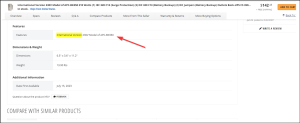
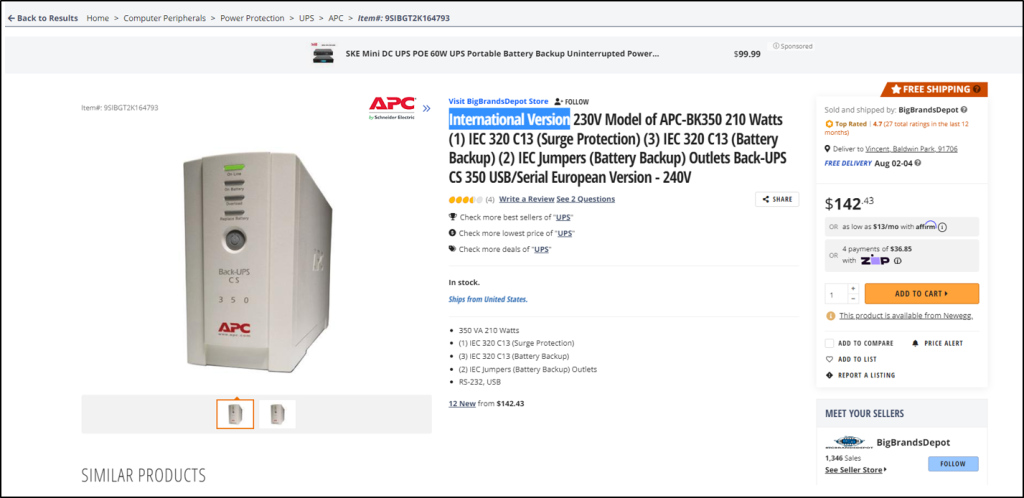
  • Include “International Version – No Warranty” in the item listing title and within the item specifications tab.
  • Ensure item images match the product being sold.

Additional Recommended Requirements (Non-mandatory):

  • Reference the location of product warranty coverage, for example, “International Version – China – No Warranty.”

Non-compliant listings will result in a notification to the seller:

  • If seller listing is a child item under US version SKU, item will be restricted, and seller will be notified to create a new parent listing for the international version.
  • If seller listing is a parent item but missing international version details, seller will have 24 hours to update the listing. Failure to comply will result in a temporary deactivation of the listing until updates are completed.

For any questions, email us at mktp.content@newegg.com.
Updated on December 9, 2025
Tagged: Account SettingsBundleContent PolicyDuplicateInaccurateInaccurate Content PolicyManufacturerProhibitedUPCviolation

Was this article helpful?

Yes No

Related Articles

  • California Proposition 65 (CA Prop 65) Compliance & Warning Clause
  • California Covered Battery-Embedded (CBE) List
  • Restocking Fee Policy
  • Refurbished Items Policy
  • Shipped by Newegg (SBN) Inventory Reimbursement Policy
  • MATCH List
  • Seller Success Guide
  • Marketplace Policies
    • Prohibited Seller Activities
    • Prohibited Items List
    • Firearms, Weapons, and Knives Policy
    • Offensive Content Policy
    • Miscategorized SKU Policy
    • Inaccurate Content and International Version Products Listing Policy
    • Refurbished Items Policy
    • Restocking Fee Policy
    • Website Short Title Policy & Guidelines
    • Product Description Policy and Guidelines
    • Content Ownership – Item Creation & Modifying Existing Item Content
    • Product Image and Video Policies and Guidelines
    • Seller Logos
    • Search Engine Optimization (SEO) Guidelines
    • Customer Payment Chargebacks
    • Marketplace Chargeback Guide
    • MATCH List
    • Chargeback Reason Code
    • Shipped by Newegg (SBN) Inventory Reimbursement Policy
    • California Proposition 65 (CA Prop 65) Compliance & Warning Clause
    • California Energy Commission (CEC) Regulations
    • California Covered Battery-Embedded (CBE) List
    • 中华人民共和国的平台企业涉税信息报送要求通知
  • New Seller Account Registration
    • Seller Account Registration
    • Update Ownership and INFORM Act Information
    • Update Financial Information
    • Update Credit Card Information
    • Update Business Information
    • Updating Return Policy and Information
    • Update Return Policy & Info (B2B, CAN)
    • Update Shipping Methods and Rates
    • Update Shipping Methods and Rates (B2B, CAN)
    • Seller Logos
    • Create New Item 3.0
    • Create Existing Item 3.0
    • Seller Payment Disbursement
    • Seller Certificate of Insurance
    • 卖家账户注册
  • Account
    • Vacation Settings
      • Vacation Mode 3.0
    • Account Settings
      • Update Business Information
      • Update Financial Information
      • Add/Update Address Information
      • Add/Update Seller Notification Email Settings
      • Login Email & Password Reset
      • Add User
      • Manage User Access
      • Disable User
      • Product Subcategories Reference List
      • Update Credit Card Information
      • Update Return Policy & Info (B2B, CAN)
      • Update Ownership and INFORM Act Information
    • Membership Settings
      • Elite Seller Program
    • Data Feed Settings
      • API Access Authorization – Requesting API Credentials
      • Global Price Sync
    • Shipping Settings
      • Add or Update Fulfillment Center
      • Prioritize Fulfillment Center
      • Updating Return Policy and Information
      • Updating Inventory Return Address on Newegg.com
      • Update Shipping Methods and Rates
      • Update Shipping Methods and Rates (B2B, CAN)
      • Setup Newegg International Shipping Program
      • NISP
      • Remove Newegg International Shipping Program
      • Update Warehouse/Fulfillment Center (B2B, CAN)
      • Update Tax Settings (CAN)
      • Enable or Disable Newegg Return Service
      • Update Shipping by Item Level
  • Seller Portal Home Navigation
    • Seller Portal Interface & Navigation 3.0
    • Seller Quote Confirmation
  • Items
    • Pricing & Inventory
      • Updating Items 3.0
      • Update Active/Inactive Items 3.0
      • Update Pricing and Inventory 3.0
      • Create Individual Product Variations
      • Create Individual Product Variations 3.0
      • Create/Update Product Variant Groups 3.0
      • Favorite Listing 3.0
      • View Items 3.0
      • View Items
      • Customize Item List
      • Update Active/Inactive Items
      • Update Item Content
      • Update Price Information and/or Shipping
      • Check Available Quantity
      • Update Available Quantity
      • Delete Items
      • Setup Third-party Warranty per Item
      • Removed Listings
      • View Estimated SBN Fee
      • View Local & USD Currency
      • Add Sales Area
      • Automate Pricing
      • California Energy Commission (CEC) Regulations
      • Creating Items with Customized Upgraded Parts
      • Listing Quality Score (LQS): Improve Your Listing Quality and Sales Performance
      • Managing B2C–B2B Product Sync
      • Share Feature in Pricing & Inventory
    • A+ Content
      • A+ Content Portal User Guide
      • One-Click A+ Content Image Generation
    • Item Creation
      • Create New Item 3.0
      • Create Existing Item 3.0
      • Listing Quality Score
    • Batch Item Creation/Update
      • Batch Create New Items
      • Batch Create Existing Items
      • Batch Update Items Contents (Basic and Subcategory Information)
      • Batch Update Items Contents (Basic Information)
      • Batch Group Related/Variant Items
      • Batch Item Deletion
    • Batch Update Price
      • Batch Update Items Price, Shipping, Limit Quantity and Activation
      • Batch Update International Price
      • International Price Mirroring
      • Global Price Sync
    • Batch Update Inventory
      • Batch Update Items Inventory per Fulfillment Center
      • Batch Update Items Inventory, Price, Shipping, Limit Quantity and Activation (B2B, CAN)
    • How to Create Product Variations
      • Create/Update Product Variant Groups 3.0
      • Create Individual Product Variations 3.0
      • Create Individual Product Variations
      • Batch Group Related/Variant Items
    • Volume Discount
      • Create Volume Discount
    • Batch Warranty Settings
      • Setup Third-party Warranty by Batch
    • Pricing Safeguards
      • Account Safeguard Setting
      • Item Safeguard Setting
      • Price Alter
      • Batch Item Price Safeguard
    • Manage Your Delivery Time
    • Video Managment
      • Add Videos on Product Detail Page
  • Orders
    • Order List
      • Order List 3.0 User Interface
      • Ship Order 3.0
      • Edit Shipment and Updating Your Tracking Number
      • Cancel Items in Order 3.0
      • Newegg International Shipping Program Ship Order
      • Batch Print Order Packing List or Commercial Invoice
      • Issue Courtesy Credit
      • View Order Processing History
      • Newegg Authorized Carriers
      • Buy Shipping Labels
      • Attention: Inventory Rollback
      • Edit Multi-Channel Seller Order ID 3.0
    • Return List
      • Create Return Merchandise Authorization and Returnless Refund 3.0
      • Complete Return Request
      • Appeal Types and Use Cases
      • Edit Return Merchandise Authorization
      • View Return Process History
      • Edit Return Merchandise Authorization from Replacement to Refund
    • Pre-order List
      • Create and Manage Pre-orders
    • Batch Ship Order
      • Batch Process Unshipped Orders
    • Create Multi-Channel Order (SBN Management Only)
      • Create Multi-Channel Order
    • Signature Options
      • Newegg Shipping Label Service
      • Multi-Channel Order
    • Claims
      • View & Resolve Claims
    • Appendix Obtaining Additional Order Information Report
  • Messages
    • Messages 3.0
    • View Customer Message
    • Customer Message Reply/Send
    • Send Message to Customer
  • Manage Store
    • Manage Store (Non-Elite Sellers)
    • Manage Premium Store
  • Marketing Tools
    • Promotions
      • Submit Newegg Campaigns
      • Newegg Promotion Dashboard
      • Add Product Discounts (General Promotions)
      • Batch Create Product Discounts (General Promotions)
      • View and Update Product Discounts (General Promotions)
      • Create Promotion Code
      • View and Update Existing Promotion Codes
      • Batch Create Promotion Codes
      • Feature: Free Gift Auto Add-to-Cart (AATC)
      • Combo Promotion
    • Newegg Attribution
    • Campaigns
      • Campaign Types
    • Post Purchase Email
      • Manage Post Purchase Email (Enterprise Sellers)
    • Search Engine Marketing
      • Sponsored Products Ads – Seller Search Engine Marketing (SEM) Tool
    • Sponsored Ads
      • Automated Offsite Ads – Sponsored Ads
      • Create a Sponsored Brand Ad
      • Create a Sponsored Display Campaign
      • Create a Sponsored Product Ad Campaign
      • Create Sponsored Video Ads Guide
      • Sponsored Ads Negative Product Targeting
    • 直播推广
  • Shipped by Newegg
    • Shipped by Newegg (SBN) & Shipping Settings
    • Work on Shipment List for Newegg Warehouse – Shipped by Newegg (SBN)
    • View Inventory Dashboard
    • View Received History
    • View Replacement Reports
    • Updating Available Quantity for Shipped by Newegg
    • Share SBN Inventory between B2B/B2C
    • How to Create a Return Inventory Shipment
    • View Newegg Return Service Report
    • Enable Signature Services for SBN
    • Get Alerted when Shipped by Newegg Inventory is Low or Out of Stock
    • Automated Multi-Channel Order Fulfillment
    • Shipped by Newegg (SBN) Inventory Reimbursement Policy
  • Manage Offers and Quotes
    • B2C Offer Management
    • B2B Quote Management
  • Brands
    • Brands Enhancement
      • Add or Reference Manufacturer in Newegg Marketplace
      • Product Review
      • Claim Brand Ownership Request
      • Brand Authorization and Syndicated Reviews
      • UPC Exemption Application/Approval Process
  • Analytics
    • Sales Dashboard and Seller Traffic Report
    • View Sales
    • View Payment Reports
    • Reserved Balance
    • View Commission Rates
    • View Item Report
    • View Voided Orders Report
    • View Returns Report
    • View Sales by Region
    • View the Buybox Report
    • Unsold Listing Fees
    • Item Overage Fees
    • Return Report
  • Performance
    • View Seller Account Health Dashboard
    • Seller Review
    • Top Rated Seller
  • Integration and Service Partners
  • Seller Programs & Features
    • Program Introductions
  • Resources
    • Global Seller Payment Options
    • Agreements, Policies and Forms Information
    • Navigation List/Taxonomy Guide
    • User & Service Guides
    • Micromobility Device Products Testing and Certification Information
    • Product Recalls and Safety Information
  • Activate Global Shipping
    • Newegg Global Setup
  • Help
    • Newegg Chatbot
    • Seller Case Management
  • Manage Returns
    • Issue Courtesy Credit
    • Create Return Merchandise Authorization and Returnless Refund 3.0
    • Complete Return Request
    • Appeal Types and Use Cases
    • Edit Return Merchandise Authorization
    • View Return Process History
    • Edit Return Merchandise Authorization from Replacement to Refund
  • FAQ

Need Support?

Can’t find the answer you’re looking for? Don’t worry we’re here to help!

Contact Support

© Copyright NeweggMarketplace|Cookies Preferences