Newegg Marketplace Seller AcademyNewegg Marketplace Seller Academy
    • Seller Success Guide
    • How to Register as a Seller
    • Apply to Sell on Newegg Marketplace
    • Seller Portal & Service Guides
    • Link to Seller Portal
    • Download App
      • Campaign Type
      • SEM Tool
      • Marketing Tools
    • Shipping & Fulfillment
    • Newegg Marketing
      • Accelerated Payment
      • Capital Advance
    • Seller Academy
      • Seller Payment Disbursement
      • Global Seller Payment Options
      • View Payment Reports
    • Success Stories
    • Integration and Service Partners
    • Policies & Forms
    • Frequently Asked Questions
    • Navigation List/Taxonomy Guide
  • Developer API
  • Contact Us
  1. Home
  2. Performance
  3. View Seller Account Health Dashboard

View Seller Account Health Dashboard

To maintain good performance on Newegg Marketplace, your seller performance will be reviewed on a monthly basis.

In the event that your seller account does not meet one or more performance metrics during a particular review period, a warning email will be given requiring remedial actions immediately. If your seller account does not meet performance expectations for two consecutive review periods, then your seller account may be at risk of losing selling privileges on Newegg Marketplace.

To access this function, go to Seller Portal and hover your mouse pointer over the list icon (upper left corner) then select Performance > Account Health.
Available platforms: Newegg.com, Neweggbusiness.com, Newegg.ca

Contents

  • Account Health UI
  • Order Performance
    • Order Defect Rate
    • Refund Rate
  • Shipping Performance
    • Pre-fulfillment Order Void Rate
    • On-time Order Fulfillment Rate
    • On-time Order Delivery Rate
    • Valid Tracking Number Rate
  • Message Performance
    • On-time (under 48 hours) Response Rate
  • Store Rating Performance
  • Regional Delivery

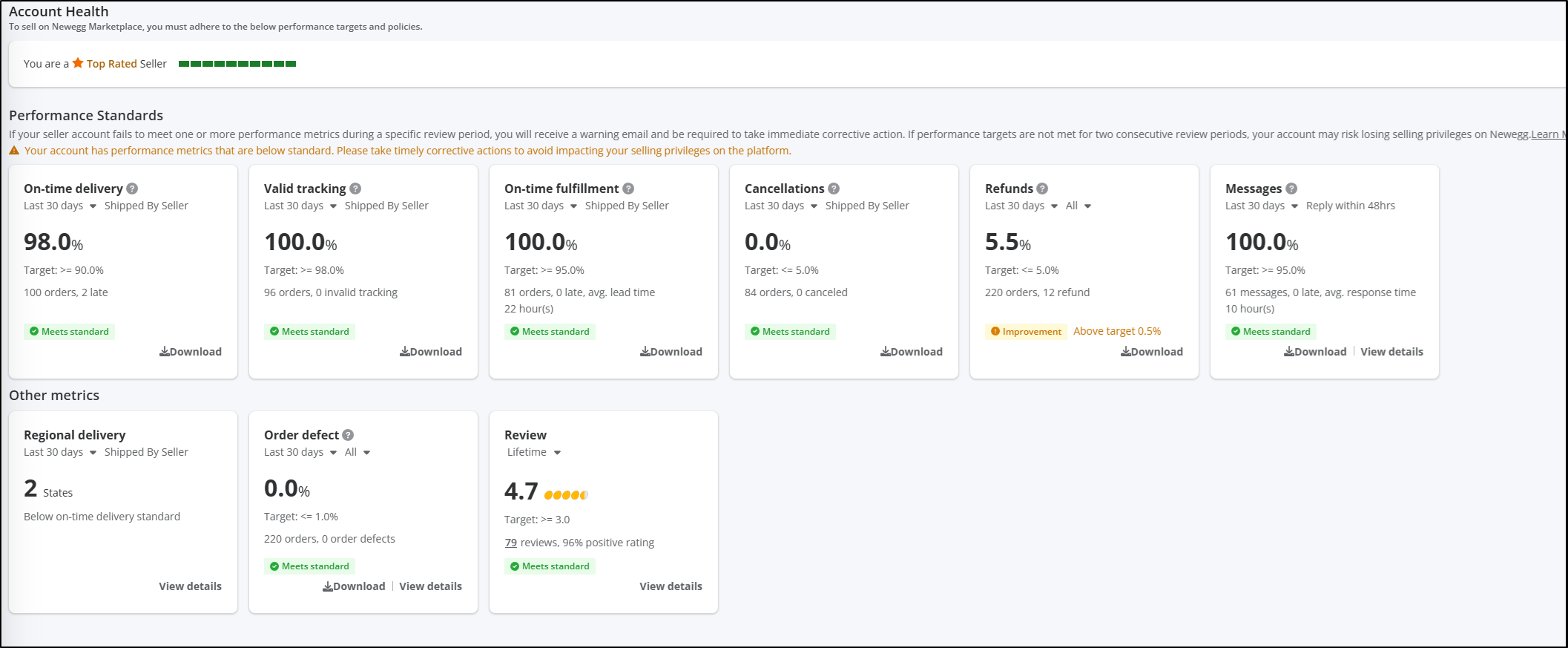
Account Health UI

  • Order Performance
  • Shipping Performance
  • Message Performance
  • Store Rating Performance
  • Regional Delivery

Order Performance

Your overall Order Performance consists of several of your account metrics factors such as
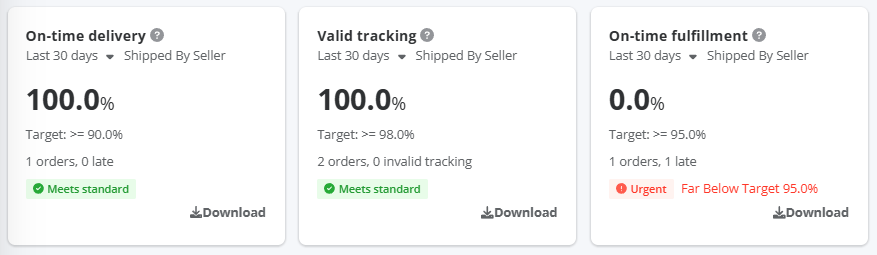
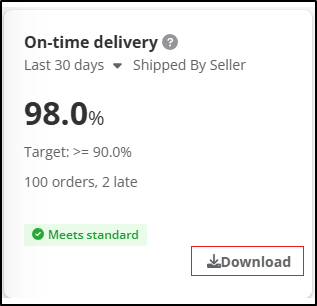
On-time Delivery, Order Defect Rate, Valid Tracking and other factors.
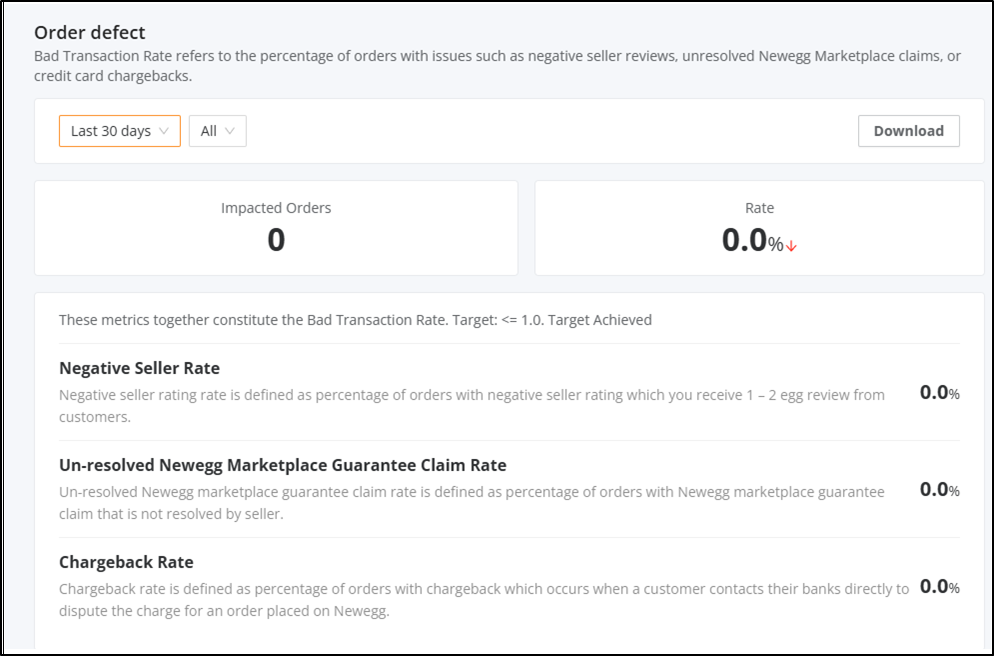
Order Defect Rate

Order Defect Rate is defined as the percentage of orders with a negative seller rating, unresolved Newegg Marketplace guarantee claim rate, and chargeback rate.

How Newegg is measuring: 

Target = For good standing, this metric should be less than 1%.
Order Defect Rate = (Negative Seller Rating Rate + Unresolved Newegg Marketplace Guarantee Claim Rate + Chargeback Rate)
Negative Seller Rating Rate = Total Order Received Negative Rating Count / Total Invoiced Order Count
Unresolved Newegg Marketplace Guarantee Claim Rate = Total Unresolved Claim Order
Chargeback Rate = Total Chargeback Order Count / Total Invoiced Order Count

  • Orders with negative seller ratings are orders getting 1 or 2 eggs seller ratings from a customer review.
  • Unresolved Newegg Marketplace Guarantee Claim Rate. Customers can file a guarantee claim based on Newegg Marketplace Guarantee Program when they are not satisfied with an order. A high unresolved claim rate will result in poor seller performance. Sellers can find out more details regarding the Newegg Marketplace Guarantee program on our seller FAQ or customer help.
  • Order chargeback rate. When a customer disputes an order charged to their credit card with their bank, it’s referred to as an order chargeback request.
  • Total Invoiced Order Count indicates all orders with payment received.
  • When an order was charged back and with a negative seller rate, it will be only counted as 1.
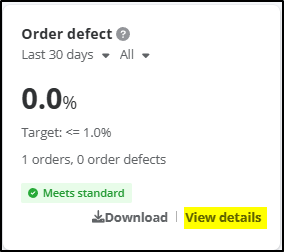
  • Click the VIEW DETAILS link to show this break out window of that attribute.
Refund Rate

The refund rate is defined as the percentage of the refund issued for invoiced orders.

How Newegg is measuring: 

Target = For good standing, this metric should be less than 5%.
Refund Rate = Total Refund Order Count / Total Invoiced Order Count
Total Refund Order Count = the orders with a refund issued.
Total Invoiced Order Count = all orders with payment received.

Shipping Performance

Pre-fulfillment Order Void Rate

Pre-fulfillment order void rate is defined as the percentage of orders voided by a seller.

How Newegg is measuring: 

Target = For good standing, this metric should be less than or equal to 5%.
Pre-Fulfillment Order Void Rate = Total Void Order Count / Total Order Count
Total void order Count = all the orders voided either by the seller for any reasons or by system auto void before seller’s allowable order fulfillment time frame expires
Total orders = all orders passed to sellers for fulfillment

  • Total orders & total void orders are both based on the date seller receives the order.

On-time Order Fulfillment Rate

Fast and reliable order processing is one of the key features that lead to eCommerce success. Newegg encourages sellers to fulfill orders within two business days for the best customer shopping experience.

IMPORTANT: This measurement is only on Shipped by Seller orders.

How Newegg is measuring: 

Target = For good standing, this metric should be greater than or equal to 95%, under 48hrs.
On-time Order Fulfillment Rate (Shipped by Seller Order Only) = Total Orders Shipped in 2 Business Days after Received / Total Invoiced Order Count
Total Orders Shipped in 2 Business Days after Received = all the Shipped by Seller orders fulfilled in 2 business days after received.
Total Invoiced Order Count = all orders with payment received.

On-time Order Delivery Rate

It is important for sellers to meet customers’ expectations and delivery requirements. On-time deliveries will increase customers’ trust and overall customer satisfaction.

IMPORTANT: This measurement is only on Shipped by Seller orders.

How Newegg is measuring: 

Target = For good standing, this metric should be equal or greater than 90%.
On-time Order Delivery Rate (Shipped by Seller Order Only) = Total On-time Delivered Orders / Total Delivered Order Count
Total On-time Delivered Orders = all packages of an order delivered equal or before the due date. The due date is calculated as the sum of the shipping service selected by the customer and the On-time order fulfillment date (2 business days).
Total Delivered Order Count = the number of delivered orders in a specified time period.

Valid Tracking Number Rate

A tracking number is a unique number assigned to each package by the shipping carrier. Valid tracking information can help customers to monitor package status and when they can expect to receive their packages.

IMPORTANT: This measurement is only on Shipped by Seller orders.

How Newegg is measuring: 

Target = For good standing, this metric should be equal or greater than or equal to 98%.
Valid Tracking Number Rate (Shipped by Seller Order Only) = Sum of Packages Confirmed by Specified Shipping Carrier / Total Number of Packages Shipped in a Specific Time Period
Sum of Packages Confirmed by Specified Shipping Carrier = Number of Trackable Packages
Total Number of Packages Shipped = Total Packages Seller has Shipped Non-Trackable Package Count = the number of all non-trackable packages

  1. The package cannot be tracked by Newegg
  2. The tracking status shows only one activity after 20 days from when the tracking number is uploaded.

Total Shipped Package Count = the total packages Seller has shipped
Total Package Count Shipped by Non-Authorized Carrier = the number of all packages shipped by Non-Authorized Carrier

Message Performance

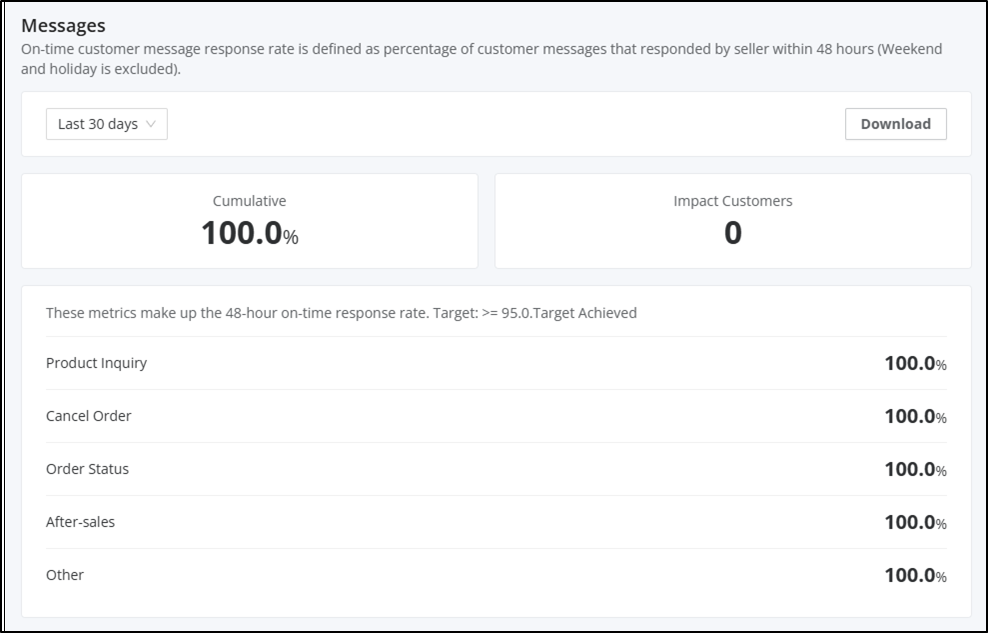
Click the VIEW DETAILS link to show this break out window of that attribute.
On-time (under 48 hours) Response Rate

Customers often ask questions before, during, and after purchases. Responding quickly and with courtesy to all customers, messages are considered a part of good customer service.

How Newegg is measuring: 

Target = For good standing, this metric should be equal or greater than 95%, under 48 hours.
On-Time (Under 48 Hours) Response Rate = Total Count of Customer Message Responded under 24 Hours / Total Count of Message Received
Total Count of Customer Message Responded under 48 Hours = the messages responded equal or less than 48 hours.
Total Count of Message Received = all messages received during a certain time period.
 

Store Rating Performance

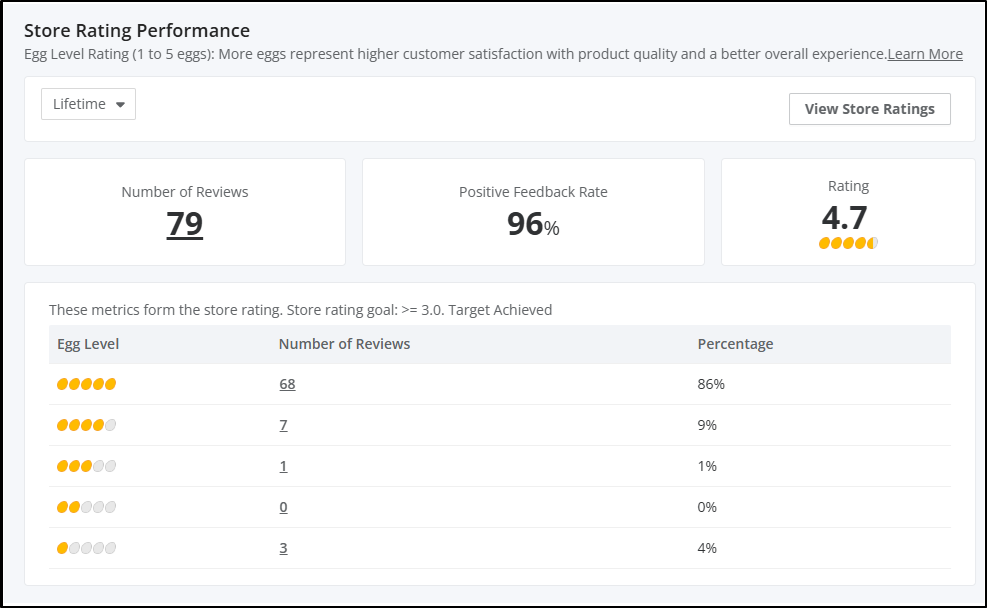
How Newegg is measuring:

Seller Rating Performance > Seller Review (Target >=3 eggs)

Click the VIEW DETAILS link to show this break out window of that attribute.
 

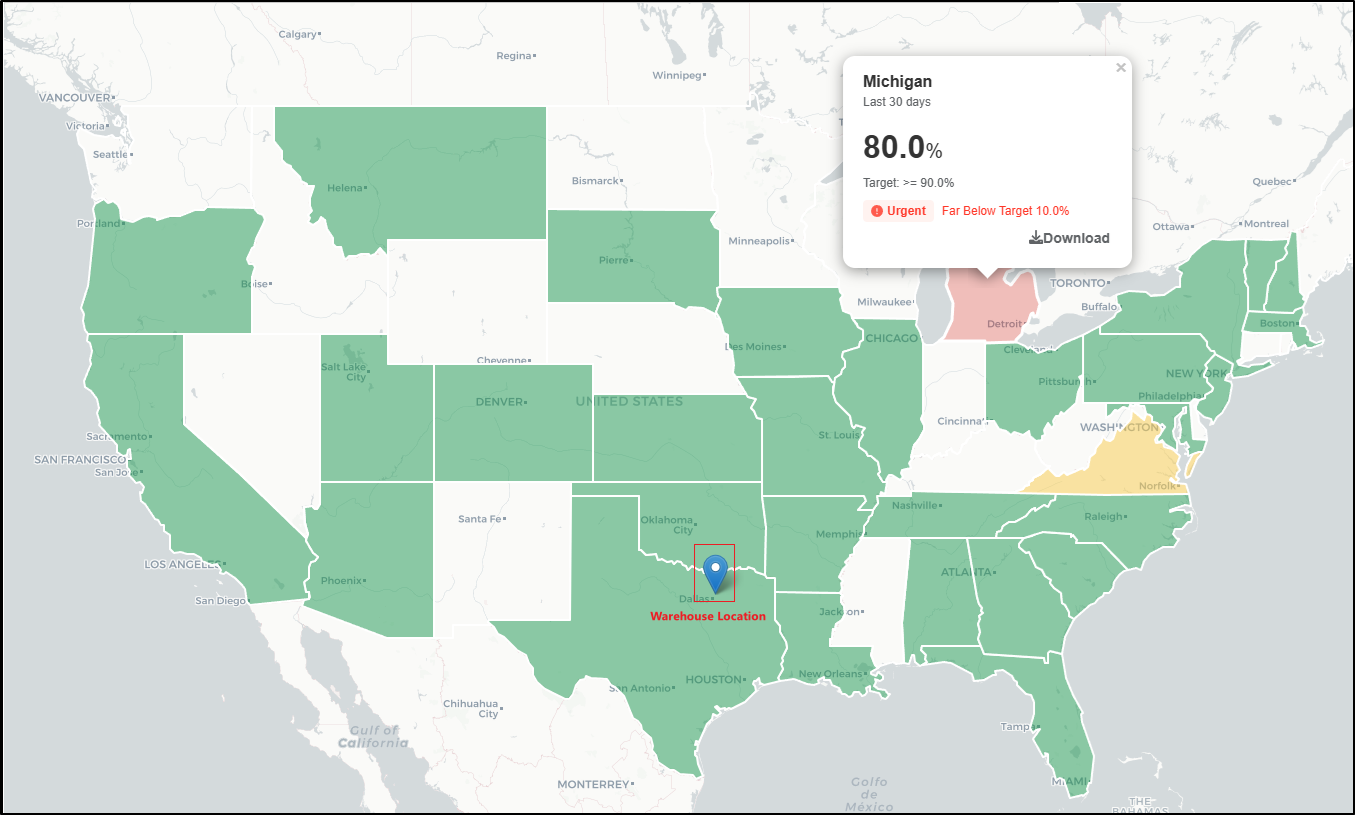
Regional Delivery

Click the VIEW DETAILS link to show this break out window of that attribute.


Click here to Learn More about prohibited seller activities on Newegg Marketplace.


Updated on May 22, 2025
Tagged: Authorized Carrier Use RateCategory Manager Request for RemovalCustomer PerformanceDuplicate Image ViolationDuplicate Item ViolationInaccurate Content ViolationIncorrect Manufacturer ViolationInvalid UPC ViolationLegal Infringement ViolationLegal Regulation ViolationMAP Price ViolationMis-categorized Item ViolationNon-Authorized Carrier User RateOffensive Item ViolationOn-time (under 24 hours) Response RateOn-time Order Delivery RateOn-time Order Fulfillment RateOrder Defect RateOrder PerformancePolicy PerformancePre-fulfillment Order Void RateRefund RateShipping PerformanceUnauthorized Item ViolationValid Order Tracking Number Rate

Was this article helpful?

Yes No

Related Articles

  • Top Rated Seller
  • Seller Review
  • Seller Success Guide
  • Marketplace Policies
    • Prohibited Seller Activities
    • Prohibited Items List
    • Firearms, Weapons, and Knives Policy
    • Offensive Content Policy
    • Miscategorized SKU Policy
    • Inaccurate Content and International Version Products Listing Policy
    • Refurbished Items Policy
    • Restocking Fee Policy
    • Website Short Title Policy & Guidelines
    • Product Description Policy and Guidelines
    • Content Ownership – Item Creation & Modifying Existing Item Content
    • Product Image and Video Policies and Guidelines
    • Seller Logos
    • Search Engine Optimization (SEO) Guidelines
    • Customer Payment Chargebacks
    • Marketplace Chargeback Guide
    • MATCH List
    • Chargeback Reason Code
    • Shipped by Newegg (SBN) Inventory Reimbursement Policy
    • California Proposition 65 (CA Prop 65) Compliance & Warning Clause
    • California Energy Commission (CEC) Regulations
    • California Covered Battery-Embedded (CBE) List
    • 中华人民共和国的平台企业涉税信息报送要求通知
  • New Seller Account Registration
    • Seller Account Registration
    • Update Ownership and INFORM Act Information
    • Update Financial Information
    • Update Credit Card Information
    • Update Business Information
    • Updating Return Policy and Information
    • Update Return Policy & Info (B2B, CAN)
    • Update Shipping Methods and Rates
    • Update Shipping Methods and Rates (B2B, CAN)
    • Seller Logos
    • Create New Item 3.0
    • Create Existing Item 3.0
    • Seller Payment Disbursement
    • Seller Certificate of Insurance
    • 卖家账户注册
  • Account
    • Vacation Settings
      • Vacation Mode 3.0
    • Account Settings
      • Update Business Information
      • Update Financial Information
      • Add/Update Address Information
      • Add/Update Seller Notification Email Settings
      • Login Email & Password Reset
      • Add User
      • Manage User Access
      • Disable User
      • Product Subcategories Reference List
      • Update Credit Card Information
      • Update Return Policy & Info (B2B, CAN)
      • Update Ownership and INFORM Act Information
    • Membership Settings
      • Elite Seller Program
    • Data Feed Settings
      • API Access Authorization – Requesting API Credentials
      • Global Price Sync
    • Shipping Settings
      • Add or Update Fulfillment Center
      • Prioritize Fulfillment Center
      • Updating Return Policy and Information
      • Updating Inventory Return Address on Newegg.com
      • Update Shipping Methods and Rates
      • Update Shipping Methods and Rates (B2B, CAN)
      • Setup Newegg International Shipping Program
      • NISP
      • Remove Newegg International Shipping Program
      • Update Warehouse/Fulfillment Center (B2B, CAN)
      • Update Tax Settings (CAN)
      • Enable or Disable Newegg Return Service
      • Update Shipping by Item Level
  • Seller Portal Home Navigation
    • Seller Portal Interface & Navigation 3.0
    • Seller Quote Confirmation
  • Items
    • Pricing & Inventory
      • Updating Items 3.0
      • Update Active/Inactive Items 3.0
      • Update Pricing and Inventory 3.0
      • Create Individual Product Variations
      • Create Individual Product Variations 3.0
      • Create/Update Product Variant Groups 3.0
      • Favorite Listing 3.0
      • View Items 3.0
      • View Items
      • Customize Item List
      • Update Active/Inactive Items
      • Update Item Content
      • Update Price Information and/or Shipping
      • Check Available Quantity
      • Update Available Quantity
      • Delete Items
      • Setup Third-party Warranty per Item
      • Removed Listings
      • View Estimated SBN Fee
      • View Local & USD Currency
      • Add Sales Area
      • Automate Pricing
      • Abnormal Pricing Protection: Review and Release Restrictions
      • California Energy Commission (CEC) Regulations
      • Creating Items with Customized Upgraded Parts
      • Listing Quality Score (LQS): Improve Your Listing Quality and Sales Performance
      • Managing B2C–B2B Product Sync
      • Share Feature in Pricing & Inventory
    • A+ Content
      • A+ Content Portal User Guide
      • One-Click A+ Content Image Generation
    • Item Creation
      • Create New Item 3.0
      • Create Existing Item 3.0
      • Listing Quality Score
    • Batch Item Creation/Update
      • Batch Create New Items
      • Batch Create Existing Items
      • Batch Update Items Contents (Basic and Subcategory Information)
      • Batch Update Items Contents (Basic Information)
      • Batch Group Related/Variant Items
      • Batch Item Deletion
    • Batch Update Price
      • Batch Update Items Price, Shipping, Limit Quantity and Activation
      • Batch Update International Price
      • International Price Mirroring
      • Global Price Sync
    • Batch Update Inventory
      • Batch Update Items Inventory per Fulfillment Center
      • Batch Update Items Inventory, Price, Shipping, Limit Quantity and Activation (B2B, CAN)
    • How to Create Product Variations
      • Create/Update Product Variant Groups 3.0
      • Create Individual Product Variations 3.0
      • Create Individual Product Variations
      • Batch Group Related/Variant Items
    • Volume Discount
      • Create Volume Discount
    • Batch Warranty Settings
      • Setup Third-party Warranty by Batch
    • Pricing Safeguards
      • Account Safeguard Setting
      • Item Safeguard Setting
      • Price Alter
      • Batch Item Price Safeguard
    • Manage Your Delivery Time
    • Video Managment
      • Add Videos on Product Detail Page
  • Orders
    • Order List
      • Order List 3.0 User Interface
      • Ship Order 3.0
      • Edit Shipment and Updating Your Tracking Number
      • Cancel Items in Order 3.0
      • Newegg International Shipping Program Ship Order
      • Batch Print Order Packing List or Commercial Invoice
      • Issue Courtesy Credit
      • View Order Processing History
      • Newegg Authorized Carriers
      • Buy Shipping Labels
      • Attention: Inventory Rollback
      • Edit Multi-Channel Seller Order ID 3.0
      • Purchase Shipping Insurance
    • Return List
      • Create Return Merchandise Authorization and Returnless Refund 3.0
      • Complete Return Request
      • Appeal Types and Use Cases
      • Edit Return Merchandise Authorization
      • View Return Process History
      • Edit Return Merchandise Authorization from Replacement to Refund
    • Pre-order List
      • Create and Manage Pre-orders
    • Batch Ship Order
      • Batch Process Unshipped Orders
    • Create Multi-Channel Order (SBN Management Only)
      • Create Multi-Channel Order
    • Signature Options
      • Newegg Shipping Label Service
      • Multi-Channel Order
    • Claims
      • View & Resolve Claims
    • Appendix Obtaining Additional Order Information Report
  • Messages
    • Messages 3.0
    • View Customer Message
    • Customer Message Reply/Send
    • Send Message to Customer
  • Manage Store
    • Manage Store (Non-Elite Sellers)
    • Manage Premium Store
  • Marketing Tools
    • Promotions
      • Submit Newegg Campaigns
      • Newegg Promotion Dashboard
      • Add Product Discounts (General Promotions)
      • Batch Create Product Discounts (General Promotions)
      • View and Update Product Discounts (General Promotions)
      • Create Promotion Code
      • View and Update Existing Promotion Codes
      • Batch Create Promotion Codes
      • Feature: Free Gift Auto Add-to-Cart (AATC)
      • Combo Promotion
    • Newegg Attribution
    • Campaigns
      • Campaign Types
    • Post Purchase Email
      • Manage Post Purchase Email (Enterprise Sellers)
    • Search Engine Marketing
      • Sponsored Products Ads – Seller Search Engine Marketing (SEM) Tool
    • Sponsored Ads
      • Automated Offsite Ads – Sponsored Ads
      • Create a Sponsored Brand Ad
      • Create a Sponsored Display Campaign
      • Create a Sponsored Product Ad Campaign
      • Create Sponsored Video Ads Guide
      • Sponsored Ads Negative Product Targeting
    • 直播推广
  • Shipped by Newegg
    • Shipped by Newegg (SBN) & Shipping Settings
    • Work on Shipment List for Newegg Warehouse – Shipped by Newegg (SBN)
    • View Inventory Dashboard
    • View Received History
    • View Replacement Reports
    • Updating Available Quantity for Shipped by Newegg
    • Share SBN Inventory between B2B/B2C
    • How to Create a Return Inventory Shipment
    • View Newegg Return Service Report
    • Enable Signature Services for SBN
    • Get Alerted when Shipped by Newegg Inventory is Low or Out of Stock
    • Automated Multi-Channel Order Fulfillment
    • Shipped by Newegg (SBN) Inventory Reimbursement Policy
  • Manage Offers and Quotes
    • B2C Offer Management
    • B2B Quote Management
  • Brands
    • Brands Enhancement
      • Add or Reference Manufacturer in Newegg Marketplace
      • Product Review
      • Claim Brand Ownership Request
      • Brand Authorization and Syndicated Reviews
      • UPC Exemption Application/Approval Process
  • Analytics
    • Sales Dashboard and Seller Traffic Report
    • View Sales
    • View Payment Reports
    • Reserved Balance
    • View Commission Rates
    • View Item Report
    • View Voided Orders Report
    • View Returns Report
    • View Sales by Region
    • View the Buybox Report
    • Unsold Listing Fees
    • Item Overage Fees
    • Return Report
  • Performance
    • View Seller Account Health Dashboard
    • Seller Review
    • Top Rated Seller
  • Integration and Service Partners
  • Seller Programs & Features
    • Program Introductions
  • Resources
    • Global Seller Payment Options
    • Agreements, Policies and Forms Information
    • Navigation List/Taxonomy Guide
    • User & Service Guides
    • Micromobility Device Products Testing and Certification Information
    • Product Recalls and Safety Information
  • Activate Global Shipping
    • Newegg Global Setup
  • Help
    • Newegg Chatbot
    • Seller Case Management
  • Manage Returns
    • Issue Courtesy Credit
    • Create Return Merchandise Authorization and Returnless Refund 3.0
    • Complete Return Request
    • Appeal Types and Use Cases
    • Edit Return Merchandise Authorization
    • View Return Process History
    • Edit Return Merchandise Authorization from Replacement to Refund
  • FAQ

Need Support?

Can’t find the answer you’re looking for? Don’t worry we’re here to help!

Contact Support

© Copyright NeweggMarketplace|Cookies Preferences