Newegg Shipping Label Service is Newegg’s cost-effective shipping solution discounted to our Newegg Elite members. To learn more about it, click here for details.
Available platforms: Newegg.com, Neweggbusiness.com, Newegg.ca
A shipper may request the carrier to obtain the recipient’s signature on delivery. Enabling the signature option is as follows:
- The signature option is under the Shipment Packing section when using this service for an order. Please see the screenshot below showing how to enable this option. Check the box to require a signature or uncheck to have no signature requirement for Signature Required.


- For full details for using Newegg Shipping Label Service for an order, click here and refer to step 4 to jump to carrier options.
To Void Shipping Labels
-
- Contact SBN@newegg.com to notify of shipping label void
- Once request has been done with, Newegg will credit back the amount charged
Signature Required from Newegg Shipping Label Purchase
Certain orders requiring a signature will use the Signature Required toggle on sales orders and in the exported feed.
- Newegg Shipping Label Purchase: If Signature Required is selected, the toggle for signature will be selected by default, if not it will be displayed as disabled.

- Order List: Orders will display a marker indicating that a signature is required when selected (see below).

- Order Detail: The detail page will also show the signature requirement.

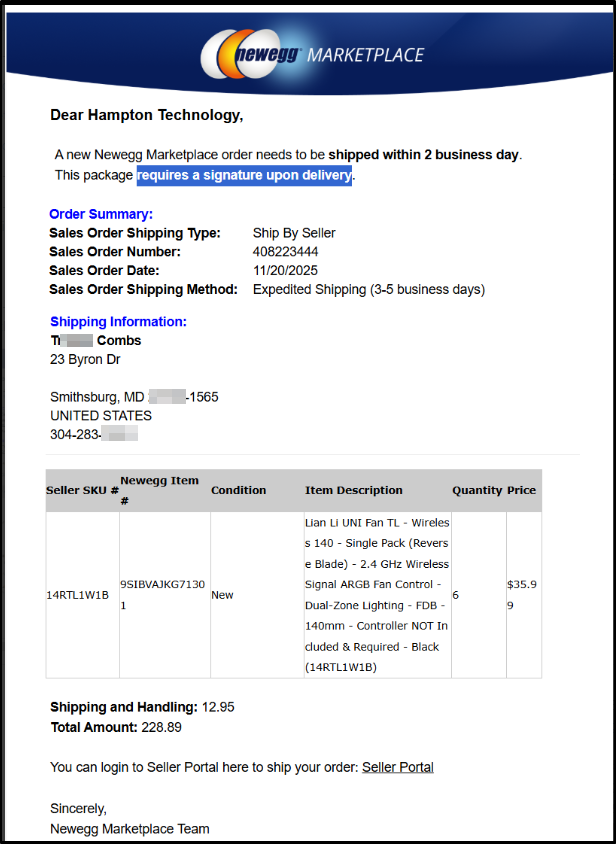
- Order Notification Emails to Seller:
If the order requires a signature, sellers will see that reflected on the email notification.