Newegg Marketplace Seller AcademyNewegg Marketplace Seller Academy
    • Seller Success Guide
    • How to Register as a Seller
    • Apply to Sell on Newegg Marketplace
    • Seller Portal & Service Guides
    • Link to Seller Portal
    • Download App
      • Campaign Type
      • SEM Tool
      • Marketing Tools
    • Shipping & Fulfillment
    • Newegg Marketing
      • Accelerated Payment
      • Capital Advance
    • Seller Academy
      • Seller Payment Disbursement
      • Global Seller Payment Options
      • View Payment Reports
    • Success Stories
    • Integration and Service Partners
    • Policies & Forms
    • Frequently Asked Questions
    • Navigation List/Taxonomy Guide
  • Developer API
  • Contact Us
  1. Home
  2. Inaccurate Content Policy - Example Case Studies

Inaccurate Content Policy – Example Case Studies

Case #1: Mismatch/Inconsistencies

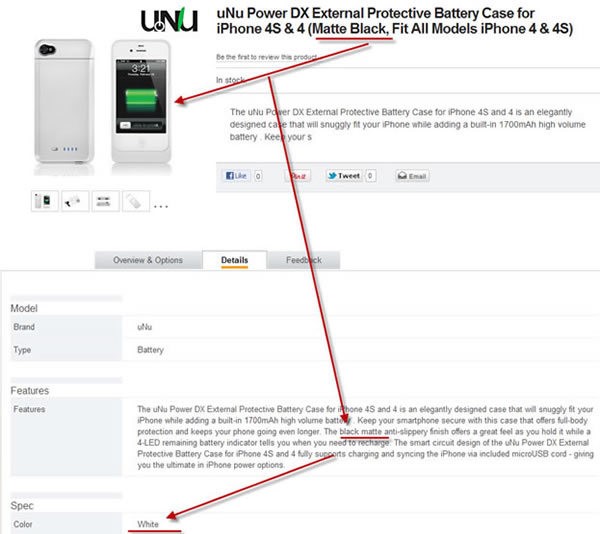
Description:  There are inconsistencies between the information in the title, image, and property values.  Some of the information states it is “Black Matte”, other information specifies that it is “White.”
Discussion:  This error is due to the seller using the wrong manufacturer part number.  The manufacturer part number for the white SKU is “PowerDX-1700W”; for the black SKU the MPN is “PowerDX-1700B”. To fix this error, we must determine if the seller intends to sell the white- or black-colored SKU.
Severity:  Medium.  The customer is unlikely to buy this SKU because they will not know what color they will get; furthermore, it is possible that the seller will ship the color the customer did not want which increases the number of RMA’s and leads to more customer complaints.
Case #2: The product description gives inaccurate information about the product

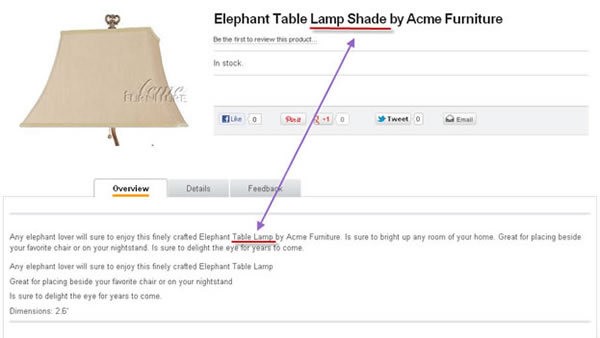
Description:  This is the wrong information for the SKU.  The product description is for a table lamp, but what the SKU is just a lamp shade.
Discussion:  The cause of this case is that the seller mistakenly supplied the wrong product information.
Severity:  High.  The customer will not know whether they are buying a lamp shade or a table lamp.  The customer will be sufficiently confused that they will not purchase this item. 
Case #3: Wrong Manufacturer Name

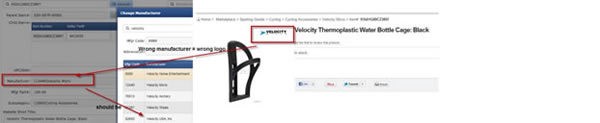
Description:  The seller selected the wrong manufacturer name.  When the wrong manufacturer name is selected, the wrong manufacturer logo appears on the product images.
Discussion:  The seller selected “Velocity Micro” who is a manufacturer of tablets, when they should have selected “Velocity USA, Inc.” who is a manufacturer of bicycle accessories.  Sometimes different manufacturers have similar names, so it is important to get this information correct.
Severity:  Medium – High.  The level of severity depends on whether the wrong manufacturer name is an important manufacturer for Newegg. 
Case #4: Wrong Manufacturer Part Number (MPN)

Description:  The table below shows three SKUs that the seller tried to provide the wrong MPN when creating the SKU.
Discussion:  In this case, the MPN is correct in the alphanumeric characters, but it is wrong because the seller did not include the dashes.  There are many MPNs that use dashes, and so it is essential that the seller not modify the syntax they receive from the vendor.
Severity:  Medium – High.  Using the wrong MPN sometimes results in the creation of duplicate listings of the same SKU because the system thinks that they are different SKUs, when in reality, they are the same SKU.  This also makes it nearly impossible to group SKUs together based on a variation in size, color, material, or other criteria.  This causes the customer to see multiple listings on the website and makes it difficult for the customer to select variants based on color or size.

Case #5: Wrong UPC

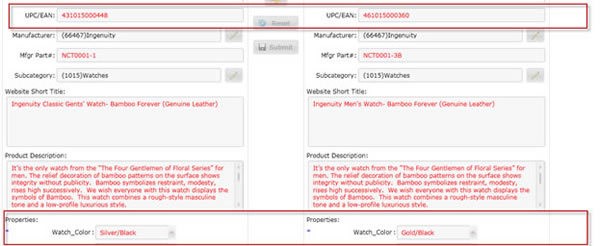
Description:  The example below shows correct UPCs for two SKUs. The two SKUs are watches – one with a silver color and the other a gold color.
Discussion:  This case shows the importance of using the correct UPC.  The UPC is a unique identifier for SKUs.  This example shows two different SKUs that are similar in every respect except color.  If the UPCs were incorrect, it would be more difficult for customers to find a different colored watch.
Severity:  High.  Wrong UPC makes increases the probability that duplicate listings will be created for the same SKU.
Case # 7: Duplicate listings of the same SKU 

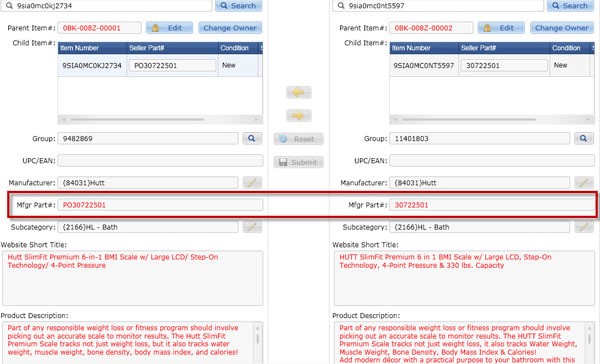
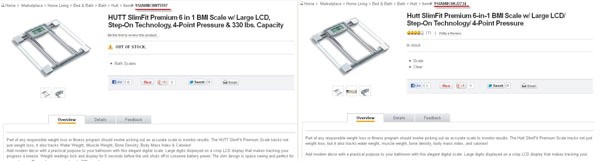
Description: This example shows a seller who created two separate listings for the exact same SKU. All of the information is nearly identical including the manufacturer name, subcategory, website short title, and product description. The only difference is that the manufacturer part # for one of the SKUs begins with “PO”. Therefore, our system thinks these are two different SKUs, when, in fact, they are really the same SKU.
Severity: Medium. Duplicate listings are redundant, clutter our search results, and confuse customers who are unable to discern the differences between the SKUs.
Case # 8: Duplicate listings of the same SKU

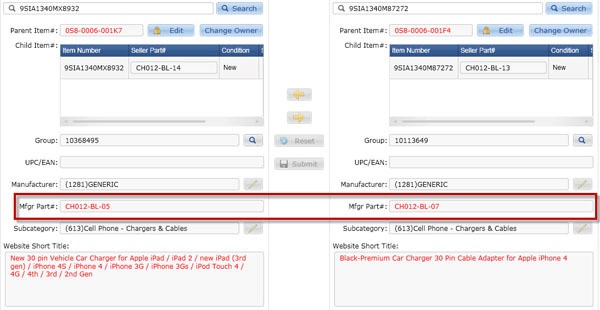
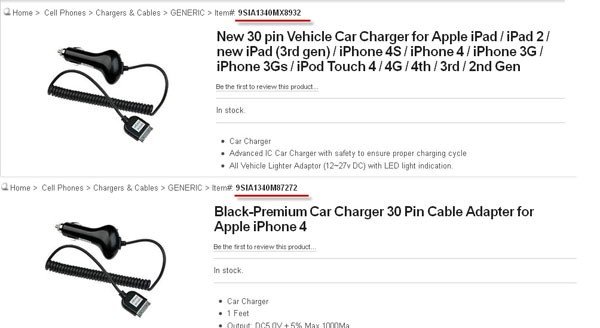
Description: This example shows the same seller who created two separate listings for the exact same SKU. Two SKUs were created because of the slight difference in the MPN. Although both of these SKUs list different lists of compatibility, the fact is that the SKU is compatible with all Apple products. Creating separate listings to list different compatibilities is strictly prohibited.
Severity: Medium-High. Duplicate listings are redundant, clutter our search results, and confuse customers who are unable to discern the differences between the SKUs.
Case # 9: Duplicate listings of the same SKU

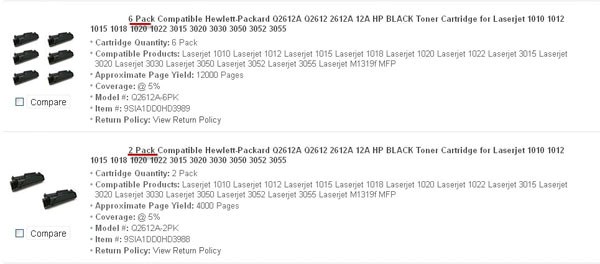
Description: The seller created duplicate listings by creating two different listings with different package sizes. One is a 6-pack and the other a 2-pack. This is strictly prohibited.
Severity: Medium-High. Duplicate listings are redundant, clutter our search results, and confuse customers who are unable to discern the differences between the SKUs.
Case # 10: Misleading Information/Portrayal of Prohibited SKUs

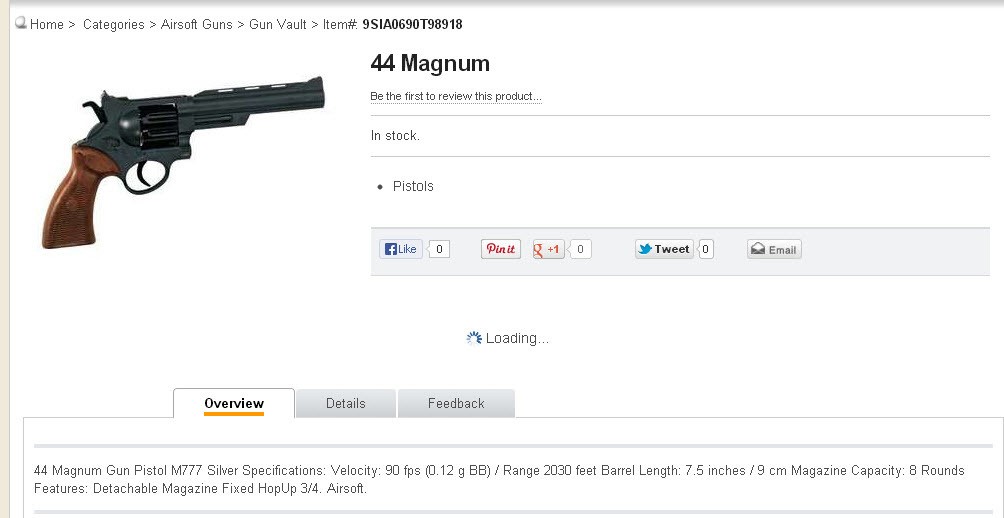
Description: This is an airsoft gun, but the image and website’s short title make it look like it is a real .44 Magnum. Furthermore, the description describes it as a real firearm, and not an airsoft gun. Only at the very end of the product description, does it state that this is airsoft, which may be unnoticed by some viewers. Guns are listed in the Prohibited Items List. Sellers must be careful that they do not attempt to portray an SKU that would violate our Prohibited Items Policy if it were real.
Severity: Medium-High. This portrays a fake gun as if it were a real gun. Firearms are prohibited as well as their depiction (including image, title, and description).
Updated on June 3, 2022
Tagged: Account SettingsContent PolicyDuplicateInaccurateInaccurate Content PolicyMismatchProhibited

Was this article helpful?

Yes No
  • Seller Success Guide
  • Marketplace Policies
    • Prohibited Seller Activities
    • Prohibited Items List
    • Firearms, Weapons, and Knives Policy
    • Offensive Content Policy
    • Miscategorized SKU Policy
    • Inaccurate Content and International Version Products Listing Policy
    • Refurbished Items Policy
    • Restocking Fee Policy
    • Website Short Title Policy & Guidelines
    • Product Description Policy and Guidelines
    • Content Ownership – Item Creation & Modifying Existing Item Content
    • Product Image and Video Policies and Guidelines
    • Seller Logos
    • Search Engine Optimization (SEO) Guidelines
    • Customer Payment Chargebacks
    • Marketplace Chargeback Guide
    • MATCH List
    • Chargeback Reason Code
    • Shipped by Newegg (SBN) Inventory Reimbursement Policy
    • California Proposition 65 (CA Prop 65) Compliance & Warning Clause
    • California Covered Battery-Embedded (CBE) List
  • New Seller Account Registration
    • Seller Account Registration
    • Update Ownership and INFORM Act Information
    • Update Financial Information
    • Update Credit Card Information
    • Update Business Information
    • Updating Return Policy and Information
    • Update Return Policy & Info (B2B, CAN)
    • Update Shipping Methods and Rates
    • Update Shipping Methods and Rates (B2B, CAN)
    • Seller Logos
    • Create New Item 3.0
    • Create Existing Item 3.0
    • Seller Payment Disbursement
    • Seller Certificate of Insurance
  • Account
    • Vacation Settings
      • Vacation Mode 3.0
    • Account Settings
      • Update Business Information
      • Update Financial Information
      • Add/Update Address Information
      • Add/Update Seller Notification Email Settings
      • Login Email & Password Reset
      • Add User
      • Manage User Access
      • Disable User
      • Product Subcategories Reference List
      • Update Credit Card Information
      • Update Return Policy & Info (B2B, CAN)
      • Update Ownership and INFORM Act Information
    • Membership Settings
      • Elite Seller Program
    • Data Feed Settings
      • API Access Authorization – Requesting API Credentials
      • Global Price Sync
    • Shipping Settings
      • Add or Update Fulfillment Center
      • Prioritize Fulfillment Center
      • Updating Return Policy and Information
      • Updating Inventory Return Address on Newegg.com
      • Update Shipping Methods and Rates
      • Update Shipping Methods and Rates (B2B, CAN)
      • Setup Newegg International Shipping Program
      • NISP
      • Remove Newegg International Shipping Program
      • Update Warehouse/Fulfillment Center (B2B, CAN)
      • Update Tax Settings (CAN)
      • Enable or Disable Newegg Return Service
      • Update Shipping by Item Level
  • Seller Portal Home Navigation
    • Seller Portal Interface & Navigation 3.0
    • Seller Quote Confirmation
  • Items
    • Pricing & Inventory
      • Updating Items 3.0
      • Update Active/Inactive Items 3.0
      • Update Pricing and Inventory 3.0
      • Create Individual Product Variations 3.0
      • Create/Update Product Variant Groups 3.0
      • Favorite Listing 3.0
      • View Items 3.0
      • View Items
      • Customize Item List
      • Update Active/Inactive Items
      • Update Item Content
      • Update Price Information and/or Shipping
      • Check Available Quantity
      • Update Available Quantity
      • Delete Items
      • Setup Third-party Warranty per Item
      • Removed Listings
      • View Estimated SBN Fee
      • View Local & USD Currency
      • Add Sales Area
      • Automate Pricing
      • California Energy Commission (CEC) Regulations
      • Creating Items with Customized Upgraded Parts
      • Listing Quality Score (LQS): Improve Your Listing Quality and Sales Performance
      • Managing B2C–B2B Product Sync
      • Share Feature in Pricing & Inventory
    • A+ Content
      • A+ Content Portal User Guide
      • One-Click A+ Content Image Generation
    • Item Creation
      • Create New Item 3.0
      • Create Existing Item 3.0
      • Listing Quality Score
    • Batch Item Creation/Update
      • Batch Create New Items
      • Batch Create Existing Items
      • Batch Update Items Contents (Basic and Subcategory Information)
      • Batch Update Items Contents (Basic Information)
      • Batch Group Related/Variant Items
      • Batch Item Deletion
    • Batch Update Price
      • Batch Update Items Price, Shipping, Limit Quantity and Activation
      • Batch Update International Price
      • International Price Mirroring
      • Global Price Sync
    • Batch Update Inventory
      • Batch Update Items Inventory per Fulfillment Center
      • Batch Update Items Inventory, Price, Shipping, Limit Quantity and Activation (B2B, CAN)
    • How to Create Product Variations
      • Create/Update Product Variant Groups 3.0
      • Create Individual Product Variations 3.0
      • Batch Group Related/Variant Items
    • Volume Discount
      • Create Volume Discount
    • Batch Warranty Settings
      • Setup Third-party Warranty by Batch
    • Pricing Safeguards
      • Account Safeguard Setting
      • Item Safeguard Setting
      • Price Alter
      • Batch Item Price Safeguard
    • Manage Your Delivery Time
    • Video Managment
      • Add Videos on Product Detail Page
  • Orders
    • Order List
      • Order List 3.0 User Interface
      • Ship Order 3.0
      • Edit Shipment and Updating Your Tracking Number
      • Cancel Items in Order 3.0
      • Newegg International Shipping Program Ship Order
      • Batch Print Order Packing List or Commercial Invoice
      • Issue Courtesy Credit
      • View Order Processing History
      • Newegg Authorized Carriers
      • Buy Shipping Labels
      • Attention: Inventory Rollback
      • Edit Multi-Channel Seller Order ID 3.0
    • Return List
      • Create Return Merchandise Authorization and Returnless Refund 3.0
      • Complete Return Request
      • Appeal Types and Use Cases
      • Edit Return Merchandise Authorization
      • View Return Process History
      • Edit Return Merchandise Authorization from Replacement to Refund
    • Pre-order List
      • Create and Manage Pre-orders
    • Batch Ship Order
      • Batch Process Unshipped Orders
    • Create Multi-Channel Order (SBN Management Only)
      • Create Multi-Channel Order
    • Signature Options
      • Newegg Shipping Label Service
      • Multi-Channel Order
    • Claims
      • View & Resolve Claims
    • Appendix Obtaining Additional Order Information Report
  • Messages
    • Messages 3.0
    • View Customer Message
    • Customer Message Reply/Send
    • Send Message to Customer
  • Manage Store
    • Manage Store (Non-Elite Sellers)
    • Manage Premium Store
  • Marketing Tools
    • Promotions
      • Submit Newegg Campaigns
      • Newegg Promotion Dashboard
      • Add Product Discounts (General Promotions)
      • Batch Create Product Discounts (General Promotions)
      • View and Update Product Discounts (General Promotions)
      • Create Promotion Code
      • View and Update Existing Promotion Codes
      • Batch Create Promotion Codes
      • Feature: Free Gift Auto Add-to-Cart (AATC)
      • Combo Promotion
    • Newegg Attribution
    • Campaigns
      • Campaign Types
    • Post Purchase Email
      • Manage Post Purchase Email (Enterprise Sellers)
    • Search Engine Marketing
      • Sponsored Products Ads – Seller Search Engine Marketing (SEM) Tool
    • Sponsored Ads
      • Automated Offsite Ads – Sponsored Ads
      • Create a Sponsored Brand Ad
      • Create a Sponsored Display Campaign
      • Create a Sponsored Product Ad Campaign
      • Create Sponsored Video Ads Guide
      • Sponsored Ads Negative Product Targeting
  • Shipped by Newegg
    • Shipped by Newegg (SBN) & Shipping Settings
    • Work on Shipment List for Newegg Warehouse – Shipped by Newegg (SBN)
    • View Inventory Dashboard
    • View Received History
    • View Replacement Reports
    • Updating Available Quantity for Shipped by Newegg
    • Share SBN Inventory between B2B/B2C
    • How to Create a Return Inventory Shipment
    • View Newegg Return Service Report
    • Enable Signature Services for SBN
    • Get Alerted when Shipped by Newegg Inventory is Low or Out of Stock
    • Automated Multi-Channel Order Fulfillment
    • Shipped by Newegg (SBN) Inventory Reimbursement Policy
  • Manage Offers and Quotes
    • B2C Offer Management
    • B2B Quote Management
  • Brands
    • Brands Enhancement
      • Add or Reference Manufacturer in Newegg Marketplace
      • Product Review
      • Claim Brand Ownership Request
      • Brand Authorization and Syndicated Reviews
      • UPC Exemption Application/Approval Process
  • Analytics
    • Sales Dashboard and Seller Traffic Report
    • View Sales
    • View Payment Reports
    • Reserved Balance
    • View Commission Rates
    • View Item Report
    • View Voided Orders Report
    • View Returns Report
    • View Sales by Region
    • View the Buybox Report
    • Unsold Listing Fees
    • Item Overage Fees
    • Return Report
  • Performance
    • View Seller Account Health Dashboard
    • Seller Review
    • Top Rated Seller
  • Integration and Service Partners
  • Seller Programs & Features
    • Program Introductions
  • Resources
    • Global Seller Payment Options
    • Agreements, Policies and Forms Information
    • Navigation List/Taxonomy Guide
    • User & Service Guides
    • Micromobility Device Products Testing and Certification Information
    • Product Recalls and Safety Information
  • Activate Global Shipping
    • Newegg Global Setup
  • Help
    • Newegg Chatbot
    • Seller Case Management
  • Manage Returns
    • Issue Courtesy Credit
    • Create Return Merchandise Authorization and Returnless Refund 3.0
    • Complete Return Request
    • Appeal Types and Use Cases
    • Edit Return Merchandise Authorization
    • View Return Process History
    • Edit Return Merchandise Authorization from Replacement to Refund
  • FAQ

Need Support?

Can’t find the answer you’re looking for? Don’t worry we’re here to help!

Contact Support

© Copyright NeweggMarketplace|Cookies Preferences