
Add shipping insurance when you ship an order to protect eligible packages against loss or damage in transit. Insurance is provided by U-PIC, which also handles claims. Newegg is not the insurer and does not review claims.
Supported platforms: Newegg.com, Neweggbusiness.com
When shipping insurance is available
You can purchase insurance for each package separately when all of the following conditions are met:
- The order is a Shipped by Seller order that is unshipped or partially shipped.
- The package must ship from the U.S., Canada, or the U.K. to a U.S. address.
- The package has a declared merchandise value of at least $10.
How to add insurance to a package
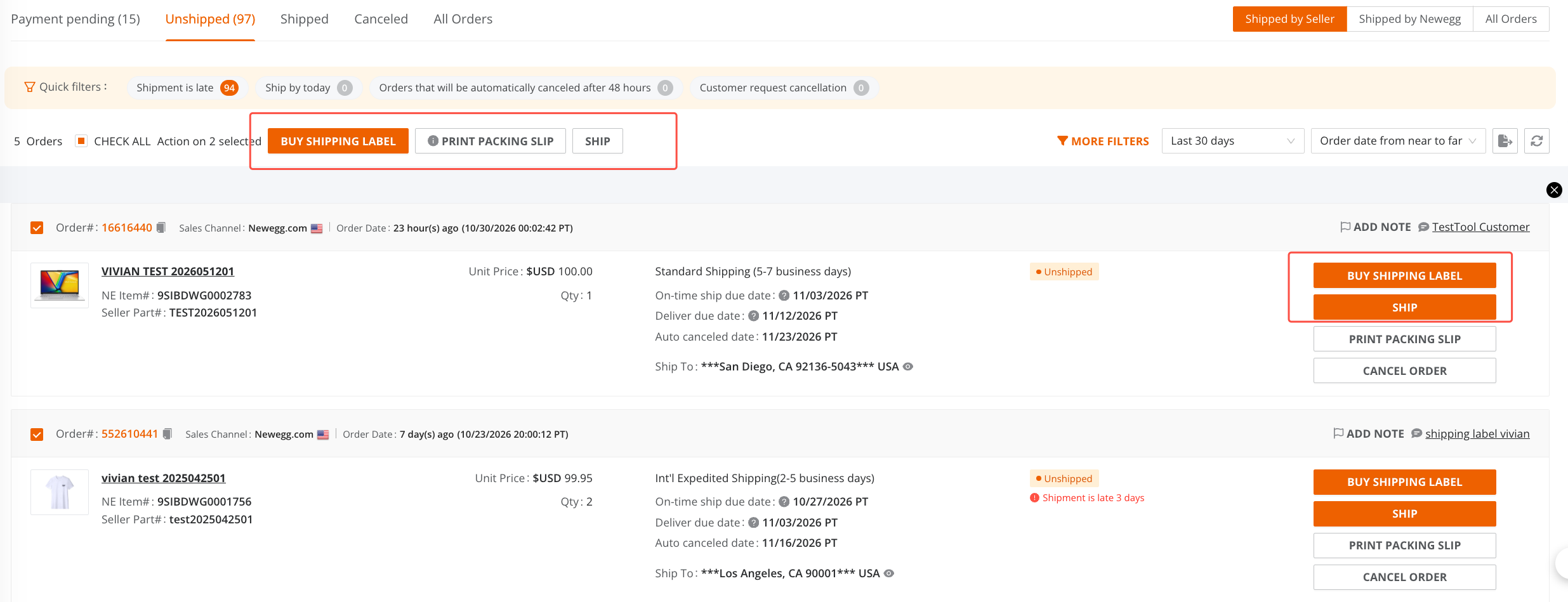
Go to Orders > Order List. Select one unshipped order or select multiple unshipped orders in bulk, then click SHIP or BUY SHIPPING LABEL.
- On the shipping page, complete the required details for your shipping method:
- Buy Newegg Shipping Label: Enter the package dimensions and weight.
- Self-ship: Select the carrier and enter the tracking number.
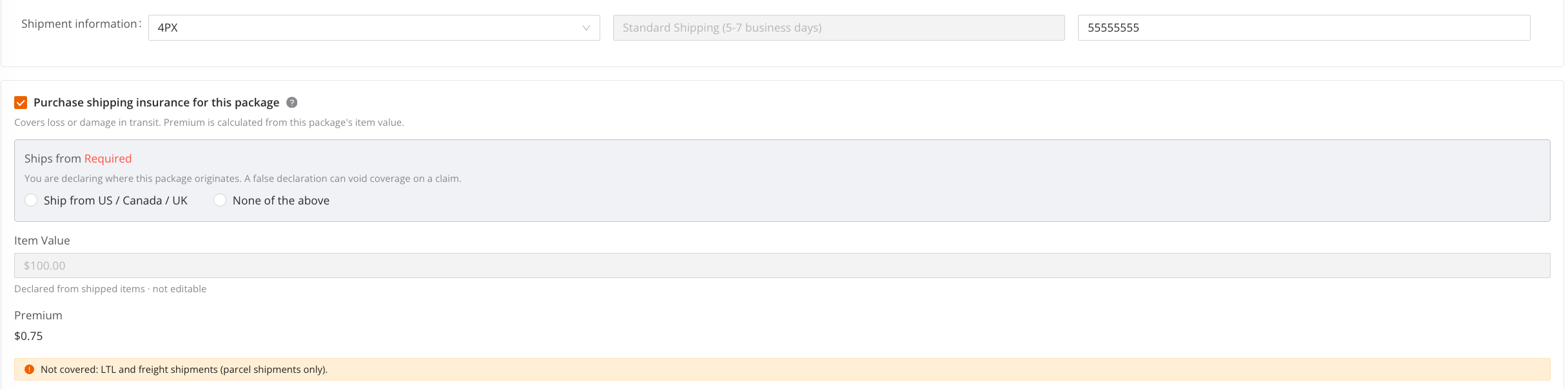
Once the information is complete, the system displays the insurance option. Select Purchase shipping insurance for this package.
Purchasing insurance when shipping a single order.
Purchasing insurance when shipping multiple orders.
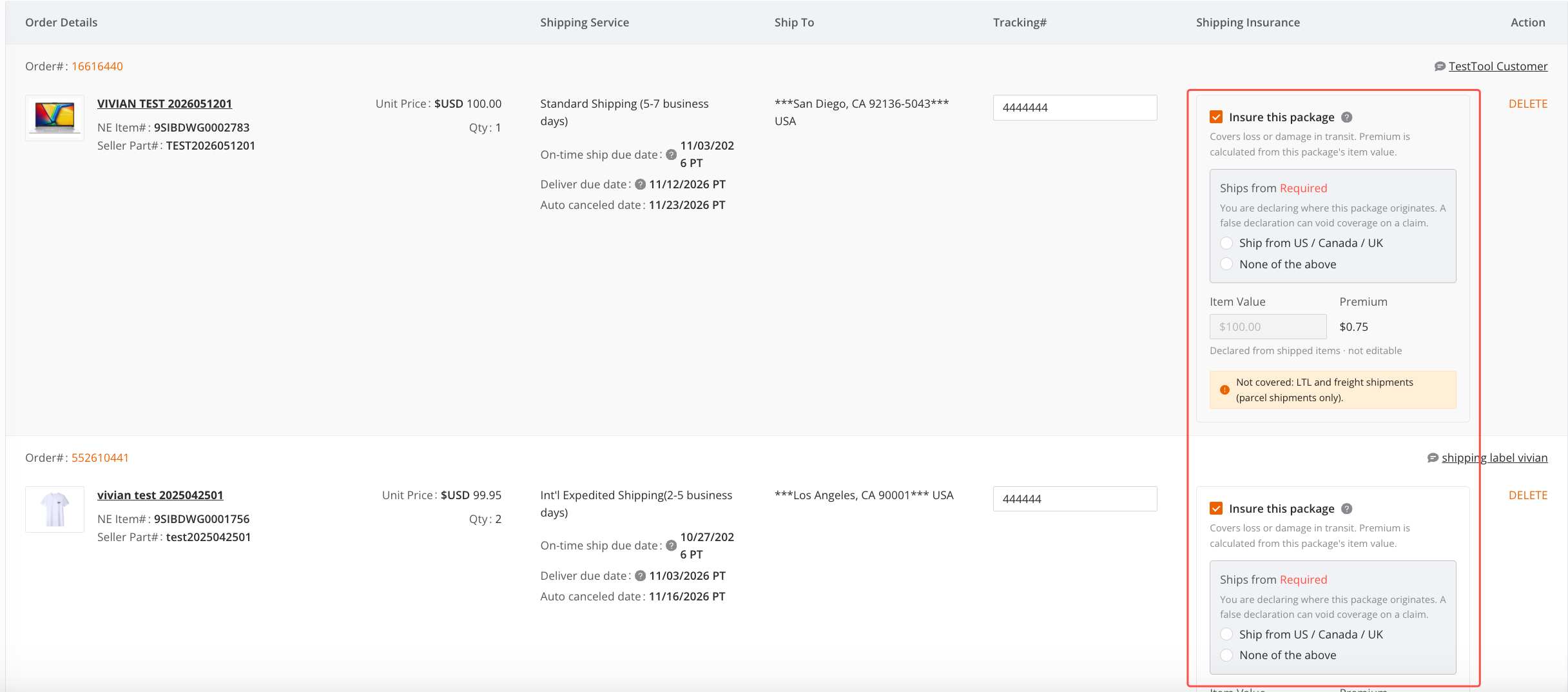
- Select the ship-from address, then click SHIP or BUY SHIPPING LABEL, depending on your shipping method.
Before your first insurance purchase: You must read and agree to the shipping insurance disclaimer.
View your insurance purchase history
Go to Analytics > Third Party Package Insurance to view your package insurance purchase history.
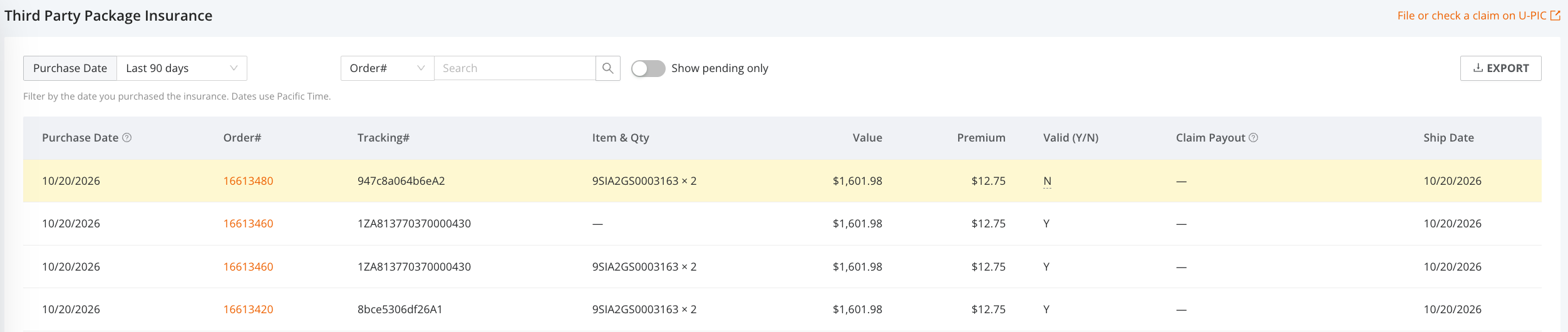
- Filter records: Use Purchase Date to select a date range, or search by Order# to find a specific order. Purchase dates use Pacific Time.
- Check pending purchases: A Pending status means the insurance purchase is still being processed. Turn on Show pending only to view these records.
- Export records: Click EXPORT to download the records as a spreadsheet.
Insurance premiums and coverage limits
The premium is $0.75 for each $100 of insured value. Any partial $100 is rounded up to the next $100 for premium calculation. All amounts below are in U.S. dollars.
| Package value | Insurance premium |
|---|---|
| $52 | $0.75 |
| $150 | $1.50 |
| $511 | $4.50 |
| $1,000 | $7.50 |
- Maximum coverage: $20,000 per package.
- Merchandise value: Calculated automatically from the declared value of the items and quantities in the package. You cannot edit this value directly.
If a package's declared value exceeds $20,000, the insurance section displays the capped value of $20,000 and a warning showing the amount above the coverage limit. For example, a package valued at $20,005.80 has $5.80 outside the coverage limit.
Note: The estimated total shipping charge does not include insurance premiums. Review the premium shown for each package separately.
Automatic selection for high-value packages
Insurance is selected automatically for an eligible package valued at $1,000 or more when its premium is calculated successfully and the applicable disclaimer requirements are met. This threshold applies to each package, not the order total.
- Three packages valued at $400 each do not qualify for automatic selection, even though the order total is $1,200.
- For packages valued at $999.99 and $1,000, only the $1,000 package qualifies.
The automatic check runs once during each visit to the order details page, starting when a package first reaches the $1,000 threshold. After that check:
- If you clear an insurance checkbox, it will not be selected again automatically during that visit.
- New packages, or packages that reach $1,000 later, are not automatically selected. Review and select insurance manually if needed.
- If an automatically selected package later falls below $1,000, its insurance checkbox remains selected.
Refreshing or reopening the order details page starts a new automatic check. Always review the final selections before buying your labels.